Session replay
Record what your users did in the browser and watch it back in the Usero dashboard. As of @usero/sdk v1.2.0 you do not need the
feedback widget: one import and one .start() call records the session, with no UI and nothing added to the DOM. If you also run
the widget, each feedback submission deep-links to the exact moment in the recording where the user hit submit.
Recording uses rrweb and streams events to Usero as gzipped chunks while the user is on the page, so you capture the whole session rather than only the moments around a feedback submission. On a slow connection the SDK merges waiting chunks into larger ones instead of dropping them, and sends what it still holds when the page is hidden or closed.
Switching to another app or tab does not end the recording. The SDK sends what it has buffered and keeps recording, and when the
person comes back the same session carries on, so feedback sent after an app switch still links to it. If they never come back,
Usero closes the session once it has been quiet for 3 minutes (the check runs every 5), with its end time set to the last upload.
A full page load, such as following a normal link to another page on your site, starts a new session; client-side route changes
stay in the same one. This needs @usero/sdk 1.6.1 or later; older versions end the recording when the page is hidden.
Install
rrweb ships inside the replay chunk, so npm install @usero/sdk is the only install step. Replay lives in its own subpath
export (@usero/sdk/replay); consumers who never import it pay zero rrweb bytes. Even after you import it, rrweb lazy-loads at
runtime via dynamic import() only once a recording starts.
Standalone (no widget)
import { sessionReplay } from '@usero/sdk/replay'

sessionReplay({ clientId: 'YOUR_CLIENT_ID' }).start()
That is the whole integration. If you know who the user is, pass getUser so replays show up under the right person:
const replay = sessionReplay({
	clientId: 'YOUR_CLIENT_ID',
	getUser: () => (auth.user ? { id: auth.user.id, email: auth.user.email } : null),
})
replay.start()

// Optional: end the recording early. Flushes buffered events and
// finalises the session server-side.
replay.stop()
getUser is re-invoked at session start and at every chunk boundary, so a login that happens mid-session is picked up without
extra wiring. Returning null after a user was identified is treated as a logout.
.start() is idempotent: calling it while a recording is live anywhere on the page is a no-op. It is also a no-op during
server-side rendering, and logs an error if no clientId was provided. .stop() flushes, finalises, and tears down listeners;
calling .start() again afterwards begins a new replay session.
React
import { useSessionReplay } from '@usero/sdk/replay/react'

function App() {
	useSessionReplay({ clientId: 'YOUR_CLIENT_ID' })
	return <Routes />
}
The hook is SSR-safe (a no-op on the server) and StrictMode-safe (the dev-mode double effect starts exactly one recording).
Recording is page-scoped: it survives the component unmounting on client-side route changes and ends when the page is closed. The
hook returns the replay instance, so you can call .stop() to end a recording early. Options are captured on first render; to
track a user who logs in mid-session, pass a getUser callback rather than changing options.
With the feedback widget
Pass the same factory to the widget's plugins array. Each feedback submission then carries a link to the exact
moment in the recording where the user hit submit, so you watch the bug instead of asking for reproduction steps. The replay also
feeds Usero's AI-drafted fix PRs: the recording is the context the AI reads before opening a pull
request.
import { initUseroFeedbackWidget } from '@usero/sdk'
import { sessionReplay } from '@usero/sdk/replay'

initUseroFeedbackWidget({
	clientId: 'YOUR_CLIENT_ID',
	plugins: [
		sessionReplay({
			// Wait 3s after load before starting. If the user navigates away
			// first, rrweb is never fetched and no session is created.
			startAfterMs: 3000,
			// Record 50% of sessions. Decided once at init.
			sampleRate: 0.5,
		}),
	],
})
In plugin mode you do not pass clientId, user, or getUser: the widget's own configuration is authoritative.
Building your own feedback UI instead of the widget? The same plugins: [sessionReplay()] works with
the headless SDK, and submissions from your custom UI deep-link into the recording the same way.
The legacy import path @usero/sdk/plugins/session-replay still works and resolves to the same module. New code should import
from @usero/sdk/replay.
One recording per page
At most one replay recording runs per page, whichever way it was started:
- If a recording was started standalone and the feedback widget mounts later with a
sessionReplay()plugin, the widget does NOT start a second recorder. It links to the running recording: feedback submissions deep-link into it, and the widget takes over user resolution while mounted. - A widget unmount never kills a recording it merely adopted. Recordings are page-scoped.
.start()while any recording is live is a no-op, which is also what makes the React hook StrictMode-safe.
Options and privacy defaults
| Option | Default | What it does |
|---|---|---|
maskAllInputs |
true |
Mask <input> and <textarea> values in the recording. |
maskTextSelector |
'[data-usero-mask]' |
Mask text content of any node matching this selector. |
blockSelector |
'[data-usero-block]' |
Skip recording matching subtrees entirely. |
inlineStylesheet |
true |
Inline external stylesheets so replays render without network access. |
sampling |
{ mousemove: 50, scroll: 100 } |
Throttle high-frequency events. |
startAfterMs |
0 |
Delay in milliseconds before loading rrweb and starting the session. |
sampleRate |
1 |
Probability (0 to 1) that a given session records at all. |
recording |
project setting | 'always', 'ask' or 'never'. See Recording. |
Standalone-only options: clientId (required for .start()), user / getUser (identify the current user), and apiUrl
(override the API host, defaults to https://usero.io). In plugin mode these three are ignored. Advanced chunking knobs
(chunkSeconds, chunkMaxEvents, chunkMaxBytes, chunkMaxAttempts, checkoutEveryMs) are documented on the
SessionReplayOptions type.
Earlier SDK versions had a bufferSeconds option for a rolling in-memory buffer. It no longer exists: recording now streams
chunks continuously, and v1.2.0's strict option typing rejects it. Remove it from your config when upgrading.
Recording: always, ask first, or never
Whether visitors are recorded, and whether they are asked first, is one setting in your project: Settings, Session replay, Recording. It takes effect without a code change or a new SDK release.
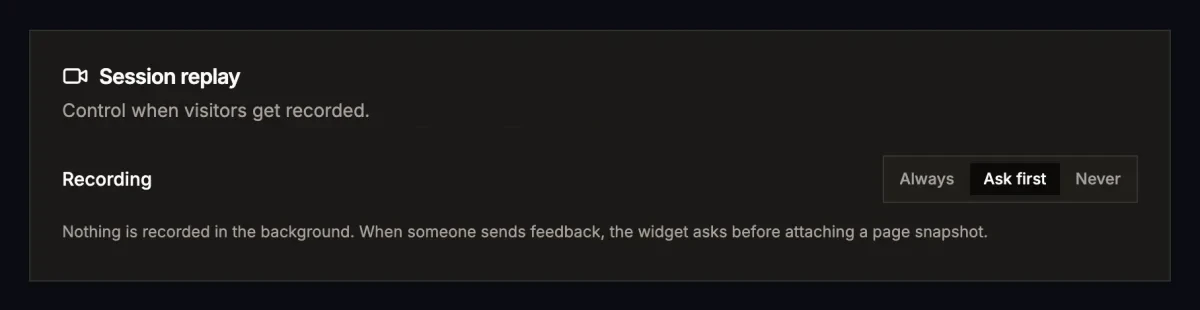
In every mode the feedback sends the moment the user clicks Send. Nothing is recorded, captured or requested for replay before that, so replay never slows down a submit.
- Always (default): record in the background as described above. If no recording is running when someone sends feedback
(sampled out, or
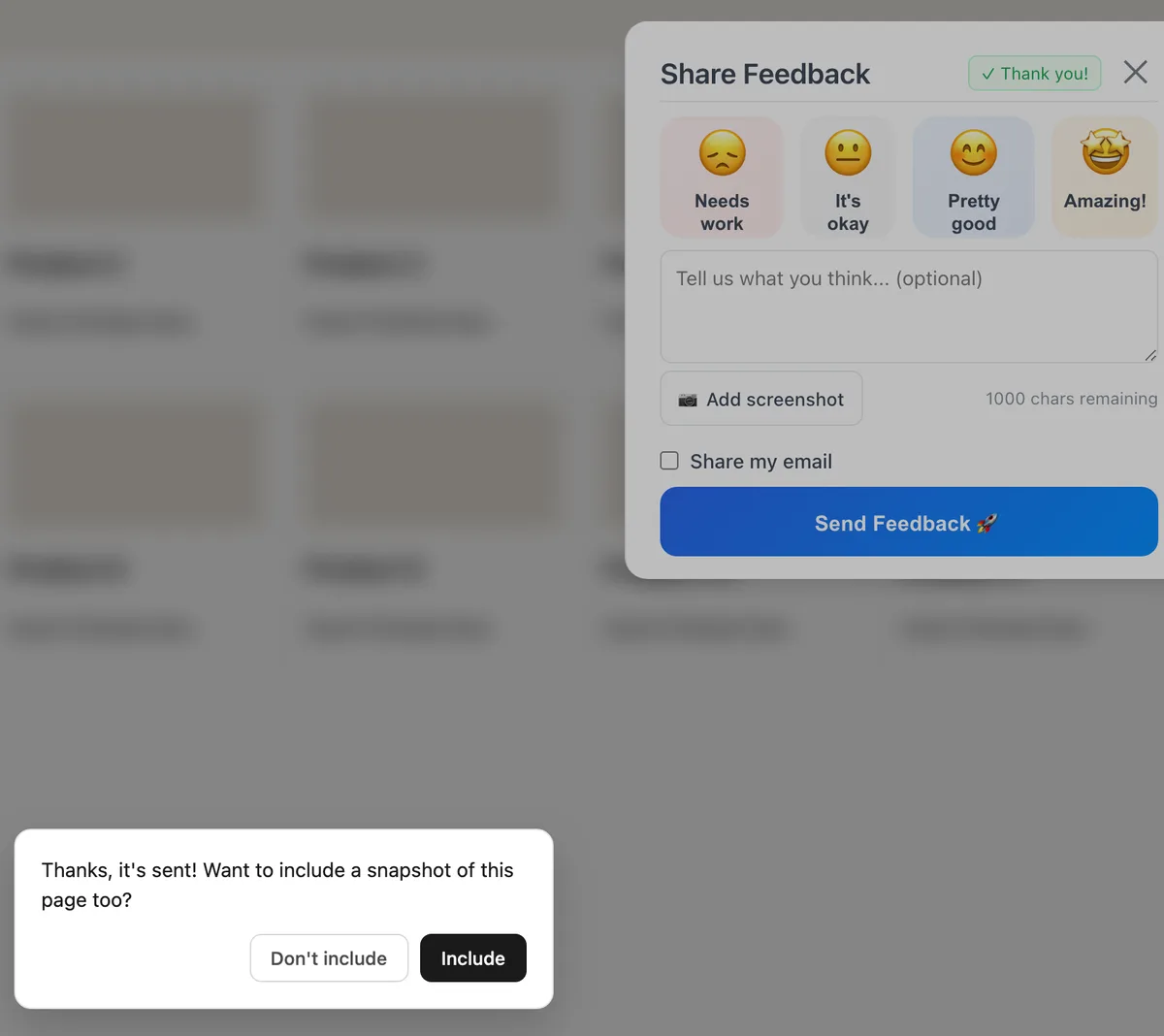
startAfterMsnot reached yet), the SDK takes a page snapshot right after the send and Usero links it to that feedback, so the report still shows what the user saw. - Ask first: nothing is recorded in the background. Once the feedback has sent, the widget asks "Thanks, it's sent! Want to include a snapshot of this page too?" with Include and Don't include buttons. Nothing is captured until they pick Include. Don't include, Escape, or 15 seconds with no answer means the snapshot is never taken, so there is nothing to delete later.
- Never: nothing is recorded, no page snapshot is taken and rrweb is never loaded. Usero also refuses new recordings for the project, so the change applies on the next request, even for a widget still running an old cached config.
The SDK fetches the setting once per page load rather than caching it in the browser, and Usero checks it again on every write, so
a stale or modified client cannot store more than the setting allows. If the fetch fails, the SDK falls back to Always, the
behaviour from before this setting existed. To pin the mode in code, pass recording: 'always' | 'ask' | 'never' to
sessionReplay(); it skips the settings fetch, and Usero still refuses anything the project setting does not allow.
Page snapshots
A page snapshot is one frame of the page, taken once the feedback has sent and the thank-you message has shown. Its session is
created with the feedback id and a one-time token from the feedback response, so Usero links it to that feedback however long the
upload takes, and nobody else can attach a snapshot to it. It uses the same rrweb serializer as a recording: maskAllInputs,
data-usero-mask and data-usero-block all apply, the widget and the Ask first prompt never appear in it, and it renders in your
page's own theme. In the dashboard it shows as a still frame labelled Page snapshot, where a recording would otherwise play.
Recording limit
Each environment of a project can start up to 60 new recordings in a burst. After that, capacity refills at one new recording per second, which is a sustained ceiling of 3,600 an hour. Sessions that start while an environment is at the limit are not recorded; the widget keeps working and feedback still sends. Recording picks up again on its own as capacity refills, and there is nothing to configure. The limit is there because crawlers hitting a public site can otherwise start thousands of recordings a minute.
The limit is counted per environment, so a busy staging site or a CI run tagged with its own environment cannot use up your
production allowance. The default environment (no environment set) always has its own allowance. Up to three other environment
names get their own allowance at a time; any further names share one more.
Masking sensitive content
Tag nodes at the source. Text inside data-usero-mask is masked; subtrees inside data-usero-block are never recorded:
<div data-usero-mask>jane@example.com</div>

<section data-usero-block>
	<!-- billing details, never recorded -->
</section>
Inputs and textareas are masked by default via maskAllInputs.
How it links to feedback
When a recording is live at the moment a user submits feedback through the widget, the widget sends sessionReplayId and
replayOffsetMs alongside the submission. This works whether the recording was started by the plugin or adopted from an earlier
standalone .start(). In the dashboard, the feedback gets a "Watch session replay" link that opens the player at that offset, not
at the session start.
If you submit feedback through the API yourself, those two fields are how a replay gets attached.
Traffic source: where the visitor came from
Every recording stores where the visitor arrived from, captured automatically when the session starts. Nothing to configure, and no campaign parameters required.
| Field | Stored on | What it holds |
|---|---|---|
referrer |
SessionReplay |
Raw document.referrer at the moment recording starts, or null if empty. |
startUrl |
SessionReplay |
The full URL of the page the visitor landed on. |
referrer |
Feedback |
Raw document.referrer at the moment the report was submitted. |
pageUrl |
Feedback |
The full URL of the page the report was submitted from. |
All four are stored as raw URLs, so the path and query string survive, not only the domain.
The session detail page renders the referrer as a friendly source label beside the timestamp and duration. Hover it to see the raw referrer URL. The label is derived like this:
- A known host shows its brand name (
news.ycombinator.comrenders as "Hacker News", anygoogle.*regional domain renders as "Google"). - An unrecognised host shows the bare host, with
www.stripped. - Your own host renders as "Direct / Internal". Usero derives your host from the session's
startUrl, so a visitor clicking from one of your pages to another is not logged as a traffic source. Without this collapsing, your own domain would show up as your top referrer. - No referrer, or an unparseable one, renders as "Direct". That covers typed URLs, bookmarks, links opened from native apps
and chat clients, and sites sending a strict
Referrer-Policy.
For what you can do with these fields, see traffic source capture.