Integrations
Jira (issue sync)
Connect a Jira Cloud site to Usero to file feedback as Jira issues, with status synced both ways. Feedback becomes issues, and moving an issue to a Done status resolves its feedback. It is the same issue sync as the GitHub and Linear integrations, pointed at Jira.
Connection is Atlassian OAuth: you approve the Usero app once for your site, then pick the project to sync with.
What it does
- Feedback becomes issues. Create issue on any feedback item opens one in the project. The issue links back to the feedback and carries the reporter (name, email, MRR and any custom data such as plan) and a replay link that opens at the moment they sent it, whenever Usero has them.
- Status follows. Moving an issue to a Done-category status (Done, Won't Do, or whatever your workflow calls them) resolves its feedback. Resolving feedback in Usero transitions its issue to one of those statuses, chosen on the card. Reopening either side reopens the other.
- Jira issues do not become feedback yet. Existing issues in the project stay in Jira. The Linear and GitHub integrations import issues; Jira import is next.
Prerequisites
- A Usero account. Anonymous visitors can browse but cannot connect Jira; the button prompts you to sign up first.
- A Jira Cloud site where you can authorise apps. Jira Server and Data Center are not supported.
Connect Jira
- Open your project, then go to Integrations (the URL is
usero.io/YOUR_CLIENT_ID/integrations). To open your own integrations page, go here. - Find the Jira card and click Connect Jira.
- Approve the Usero app on Atlassian's consent screen. Atlassian sends you back to the Jira card, now open and marked Connected.
Choose the site and project
Issue sync works with one Jira project per Usero project.
- If your Atlassian account can see more than one Jira site, the Site row appears first. Click Choose a site and pick one. With a single site there is nothing to choose and the row shows its name.
- On the Project row, which reads Not chosen yet, click Choose a project and pick the project from the list. The row then shows the key and name, with Change to swap it.
- Choosing a project switches issue sync on. Create issue starts working on every feedback item, and Usero registers a webhook on the site so status changes in Jira reach Usero.
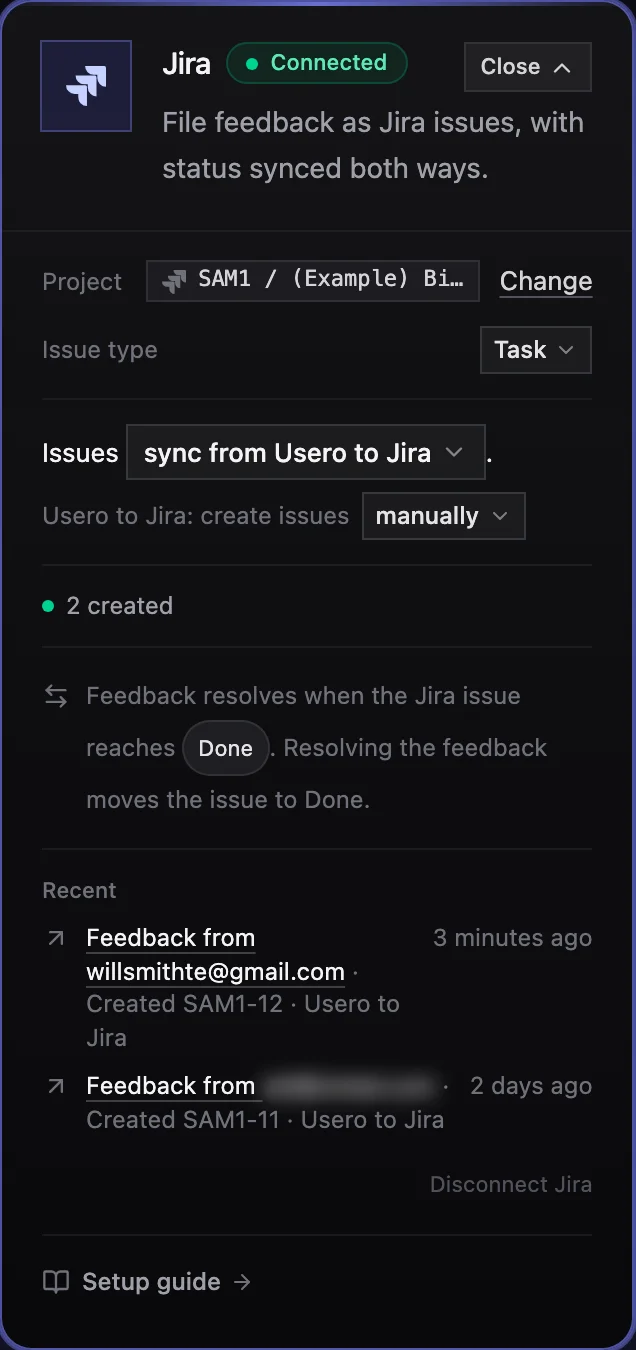
A connected card after one issue. Project, issue type, sync direction and the Done status all live here, nowhere else.
Issue type
Under the Project row, the Issue type row is a small select. It defaults to the project's first standard type, Task on most projects, and leaves out sub-task types. Pick the one your team files feedback as; Create issue uses it every time and never asks.
Issue sync
The card reads as one sentence: Issues [sync from Usero to Jira]. The dropdown has two options, Usero to Jira and Off; Off reads Issues [don't sync] between Jira and Usero. Before a project is chosen it is disabled with Pick a project first.
Under the sentence: Usero to Jira: create issues manually. By default an issue is only created when someone clicks Create issue on a feedback item. Switch the dropdown to automatically for every new feedback item or automatically for bugs only if you want Usero to open the issue for you.
The count line reads N created. Recent lists the last three sync events (Created ACME-12, Marked Done in Jira, feedback resolved, Deleted in Jira, feedback unlinked).
Only one tracker can hold Usero to X at a time. If GitHub or Linear has it and you choose a Jira project, that card changes to its to Usero only direction and shows Create issue now goes to Jira.
When feedback resolves
The status row on the card reads: Feedback resolves when the Jira issue reaches [Done]. Resolving the feedback moves the issue to Done. The chips are the Done-category statuses in the project's workflow, and this works with no setup because Jira sorts every status into one of three categories (To Do, In Progress, Done) whatever the workflow calls them. Any status outside the Done category leaves the feedback open.
With two or more Done-category statuses it reads Feedback resolves when the Jira issue reaches any of [Done] [Won't Do]. Resolving the feedback moves the issue to [Done]. That select picks which of them Usero transitions the issue to when you resolve the feedback. With one, there is nothing to choose.
A workflow with no Done-category status shows No done status in this workflow. Add one in the Jira workflow editor, then reload this page. and the row stays amber until you do.
Webhook needs a site admin
Usero registers the webhook itself when the account that connected has site admin rights. When it does not, the card shows:
Jira cannot tell Usero when issues change. Ask a Jira site admin to add a webhook, or reconnect as an admin.
Creating issues keeps working either way; only the Jira to Usero status updates wait on the webhook. Click Show the steps on the card and hand them to your admin. They read: In Jira, open Settings, System, Webhooks, and create one with:
- URL: the webhook URL from the card (copy it with the chip).
- Events: Issue updated, Issue deleted.
- JQL:
project = ACME, with your project key in place ofACME.
The line clears on its own the first time a ping lands.
Create an issue from feedback
- Open any feedback item in the inbox.
- Click Create issue. The title and description are pre-filled from the feedback; edit them if you like (no labels field, Jira issues take none here). The modal footer confirms where it goes: Creating a Task in ACME, the Jira project chosen on your Integrations page.
- The issue opens in your Jira project with the replay and the reporter linked, and the feedback item shows a chip such as ACME-142 · Open. The chip menu has View in Jira and Unlink issue. When the issue reaches a Done-category status, the chip reads ACME-142 · Closed and the feedback is resolved.
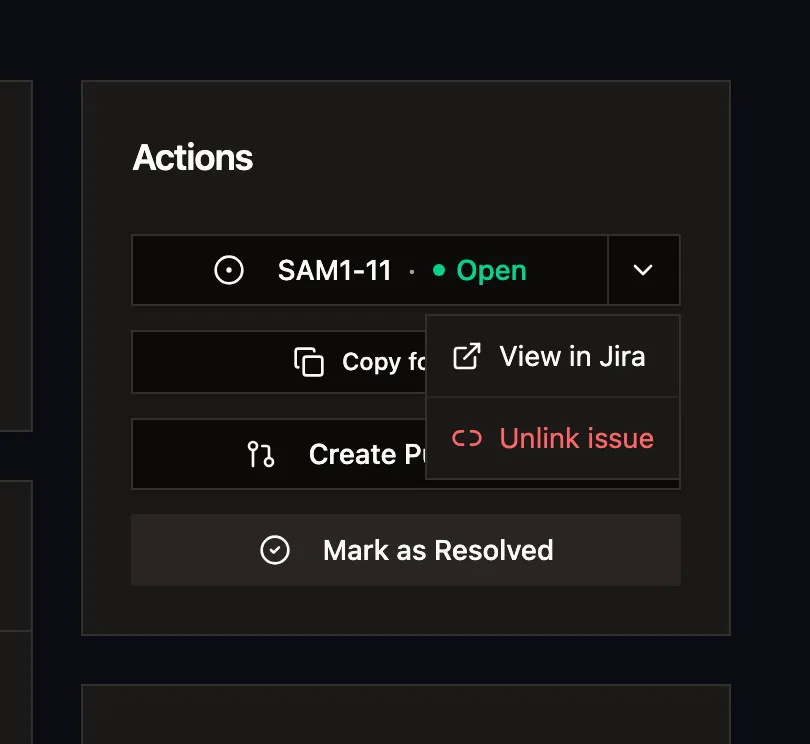
The linked issue on the feedback page. The chip shows the Jira status live, and the menu is how you jump to it or unlink it.
An agent connected over MCP can do the same with the create_issue tool and tracker: 'jira'. See the
MCP server docs.
Demand on the ticket
If the feedback came from a public board post with 2 or more votes, the description gets a Demand section: votes, companies, MRR, must-have counts and two voter quotes, never an email address. See Demand on the ticket.
Troubleshooting
The Jira card says "Not configured in this environment." Jira OAuth credentials are not set on this deployment. On usero.io
they are; on a self-hosted or preview deployment, add JIRA_CLIENT_ID and JIRA_CLIENT_SECRET.
The card says "Needs attention". The line under the sentence names the cause. Jira token expired. Reconnect Jira. and Jira lost access to ACME. Reconnect. both mean the Atlassian grant no longer works; click Reconnect Jira to authorise again. Webhooks on Jira Cloud expire after 30 days; Usero renews them every hour, and if a renewal fails the same line appears.
No projects in the list. The card reads No projects visible to this Jira account. Ask an admin for Browse Projects on at least one project, then Change site or reload. The account that connected needs to see the project in Jira before Usero can.
Create issue says Connect Jira. Jira is not ready to take issues yet, so the button links to the Jira card instead. A project must be chosen on the card, and the direction must include Usero to Jira. With no tracker set up at all, the button reads Connect a tracker. If GitHub or Linear holds Usero to X, choosing a Jira project takes it over.
Jira rejected the issue. The error names the field: Jira rejected the issue: [field] is required in ACME. Pick a different issue type on the Jira card. A required custom field that Usero cannot fill was added to that issue type. Choose another type on the Issue type row, or ask a Jira admin to make the field optional.
Status changes in Jira do not reach Usero. The webhook is missing or expired. Check the card for the Jira cannot tell Usero when issues change line and follow Webhook needs a site admin. Status follows only for issues created from feedback; an issue linked by hand in Jira is not tracked. Moving an issue to a status outside the Done category does nothing, by design. Check the Recent list on the card for the last events.
An issue was deleted in Jira. The link closes and the feedback item stays open. Recent shows Deleted in Jira, feedback unlinked.
Disconnecting. Disconnect Jira on the card asks Disconnect Jira? and explains: Issue sync stops in both directions. Linked issues keep their chip but stop updating. The chips go grey with the tooltip Jira disconnected.