Getting started
Referrals for user tests
Referrals let people you pick send others into your paid user tests. You add someone as a referrer, Usero emails them a personal link, and anyone who opens it sees your open tests and can take one. When you pay a person they referred, the referrer earns a bonus you set, for example $5 on top of a $20 test.
A referrer does not have to be a tester. It can be a friend who runs a local meetup, or a past participant who did a careful session and knows others like them.
Be clear on the money before you turn it on:
- You fund both payments. The referred person gets your normal test reward. The referrer gets the bonus. Usero pays neither.
- A bonus is earned only after you pay the referred person. Signing up, starting a test or finishing one earns nothing until you approve the session and mark it paid.
- Bonuses are a manual ledger, like session rewards. Usero records what you owe. You send the bonus yourself (a gift card or a transfer) and then mark it paid.
Turn referrals on
Referrals are set per test, in the same place as the reward.
- Open the test and go to Settings, or start a new test from User tests.
- Set a Reward per completed test. Referrals need a paid test, because the bonus is paid on top of the reward.
- Switch on Referrals.
- Set the Referral bonus. It starts at 25% of the reward, rounded to a whole amount ($5 on a $20 reward), and uses the reward's currency. It can be anything above zero up to the reward.
- Set how many bonuses each referrer can earn on this test. The default is 5, the range is 1 to 50.
- Save.
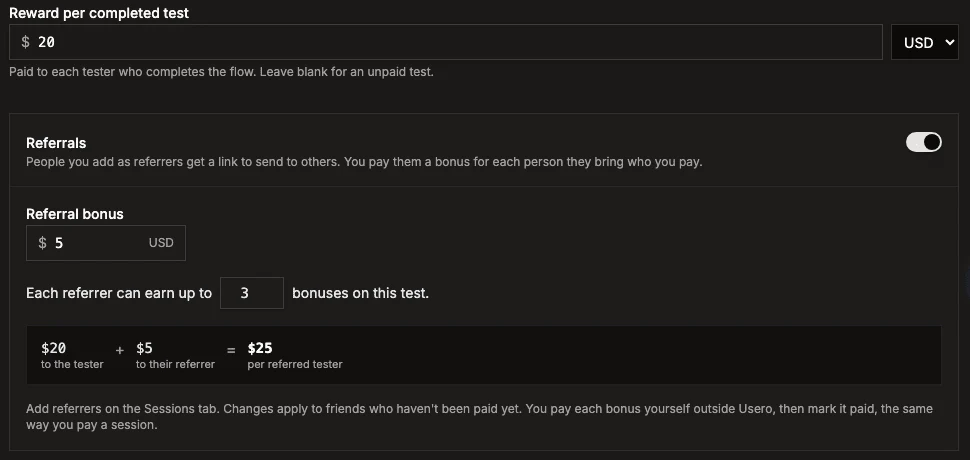
The box under the bonus shows what one referred tester costs you. If the test has screener slots, it also shows the most you would pay if every slot filled through referrals.
A bonus change applies to people who have not been paid yet. Each bonus is fixed at the moment you pay the referred person, so lowering the bonus later never changes one that is already owed. Clearing the reward turns referrals off.
Add referrers
Referrers belong to your project, not to one test. One person has one link, and it leads into every test you have with referrals on.
- Open any test with referrals on and go to the Sessions tab. The Referrals section sits under the sessions table.
- Click Add referrer.
- Enter their name and email. Friends see only the first name, on the page your link opens. Add an optional note (for example "runs the Leeds indie retail meetup"). Only your team sees the note.
- Click Add and email invite.
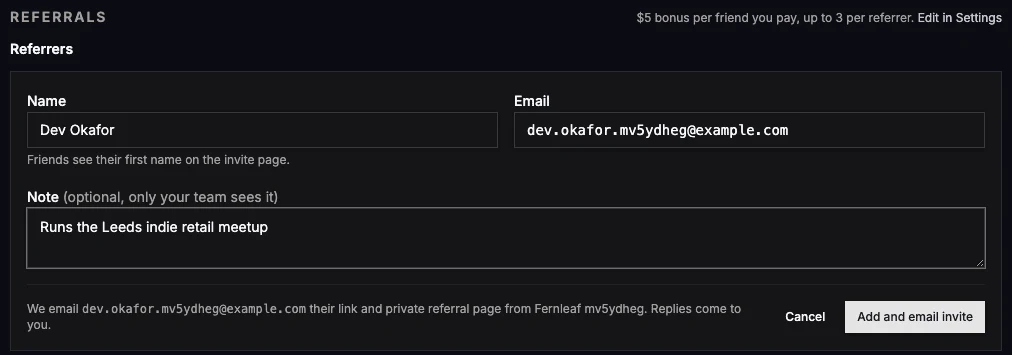
Usero emails them once, with their link and a private status page. Adding the same email again returns the existing referrer and
sends nothing. Emails are compared after lowercasing, dropping a +tag, and ignoring dots in Gmail addresses, so
Sam.Lee+ux@gmail.com and samlee@gmail.com are the same person.
You can also add someone from a session they took. Once you have paid a session, Add as referrer sits below its payment area ("Good session? They might know others like them."). One click adds that participant and emails them their link.
The referrer list shows each person's link with a Copy button, how many people they have referred, what you owe them on this test, and a Link on switch.
What referred people see
A referral link looks like usero.io/r/AG7Q97XXV6. Opening it shows:
- "Dev thinks you'd be good at this", using the referrer's first name ("A friend" when you left the name out).
- One card per open test with its reward and a Start this test button, or Check if I qualify when the test has a screener.
- A line saying their answers and recording go to you, and that Usero runs the test for you.
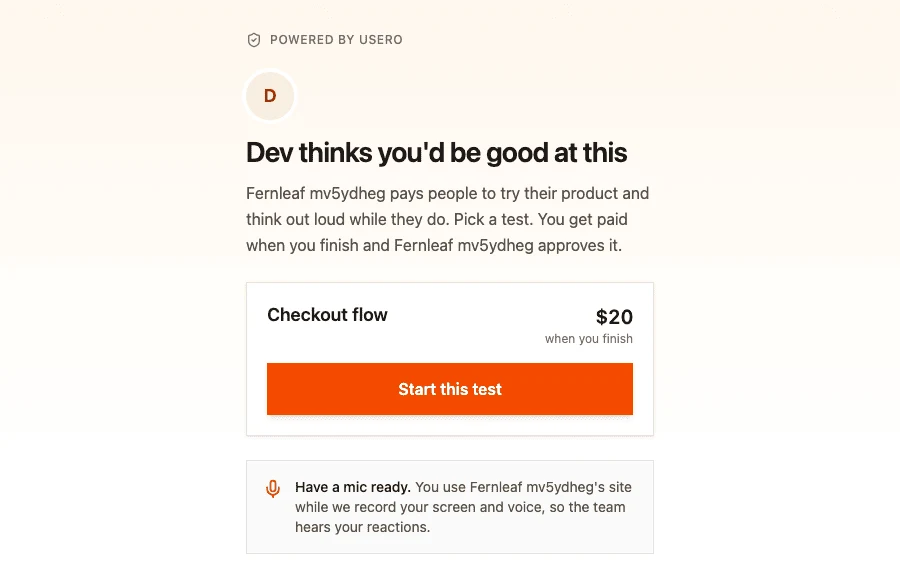
A test is listed when it has referrals on and anyone can reach it: either it is open to anyone with the link, or it has a published screener. Tests limited to an invite list never show on a referral page.
From there the person takes the test like anyone else. The test entry page shows "Invited by Dev" above the email field, and the screener (if there is one) works as usual. The referral sticks for 30 days in a cookie, and the link to the referrer is made by email address, so someone who screens on a phone and opens the test invite on a laptop still counts.
The referred person is never told that a referral was refused, and their entry into the test is never affected by it.
Review referrals and pay bonuses
Everything you need to act on is in the Referrals section of the test's Sessions tab, ordered by what needs you first:
| Group | What it means | What you do |
|---|---|---|
| Needs review | You paid the referred person and a fraud check fired. The reasons are listed in words. | Approve or Reject |
| Ready to pay | You paid the referred person and the bonus is owed. | Send the bonus, then Pay bonus |
| In progress | They signed up or are taking a test. Shows "$5 due when you pay their session". | Nothing yet |
| Paid | You marked the bonus paid. Collapsed by default. | Nothing |
| Not paid | Rejected, over the cap, or the referrer's link was turned off. Collapsed by default. | Nothing |
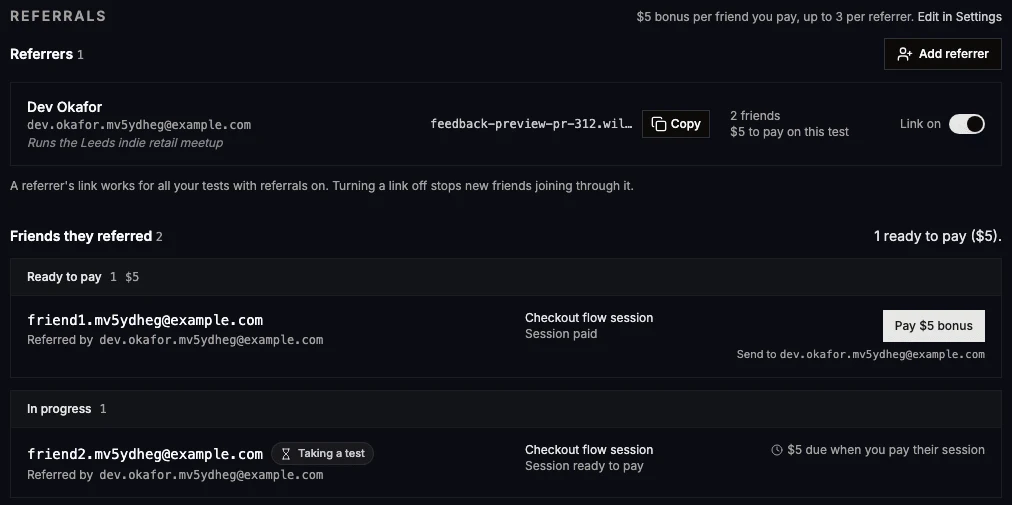
The usual order of events:
- A referred person finishes a session and it reaches Ready to pay, like any other session. Their row in the sessions table carries a small Referred chip.
- You pay their reward off-platform and click Pay on the session.
- The referrer's bonus moves to Ready to pay (or Needs review if a check fired). The session page says so right away.
- You send the bonus to the address shown under the button ("Send to ..."), then click Pay $5 bonus. Usero marks it paid and emails the referrer.

The stats strip on the Sessions tab gets a Referral bonuses figure: what you have paid, plus what is ready to pay and what is in review. Mixed currencies are listed separately.
A few rules worth knowing:
- One bonus per referred person. Someone who takes three of your tests earns their referrer one bonus, on the first session you pay.
- First referrer wins. If two referrers send the same person, the first link they used is the one that counts.
- A rejected session does not end the referral. If you reject the referred person's session, the referral goes back to "Signed up", and a later paid session on another referral test still earns the bonus.
- Paid is final. A bonus marked paid cannot be rejected, since it records money you already sent. If you find a problem after paying, turn the referrer's link off to stop future bonuses.
Caps and fraud checks
Some people never earn a referrer a bonus. No referral is created at all when:
- the referrer uses their own link (compared by the same normalised email),
- the person has already taken any of your tests, so past participants cannot be "referred" back in,
- someone else already referred them,
- the referrer's link is off, or none of your tests have referrals on.
When you pay a referred person, Usero runs these checks. Any hit moves the bonus to Needs review instead of Ready to pay:
| Check shown in review | What fired it |
|---|---|
| Same payout email as the referrer | The referred person's payout email matches the referrer's. |
| Same device as the referrer | The browser they joined or tested from was also used to open the referrer's status page. |
| Same network as the referrer | Same IP address as the referrer's status page visits. Common in households and offices. |
| Disposable email address | A throwaway inbox domain such as mailinator.com. |
| Many sign-ups on this link in one day | They were the 11th or later person to join through that link within 24 hours. |
Treat a flag as a reason to look before you pay. Same network in particular fires for flatmates and coworkers. Approve the ones that look fine.
The cap counts bonuses per referrer per test. Once a referrer has reached it on a test, further people they send to that test are recorded as Not paid with "Referrer reached the limit for this test". Their link still works for your other tests.
To stop a referrer completely, switch their link off in the referrer list. The confirm dialog tells you how many unpaid bonuses will be cancelled. Turning the link off stops new people joining through it on every test, cancels their unpaid bonuses, and leaves paid ones alone. Turning it back on later does not restore cancelled bonuses.
Usero stores IP addresses and device ids only as keyed hashes, used for these checks and nothing else. The public referral pages are rate limited to 60 requests a minute per visitor.
What referrers see
The invite email links to a private status page. Referrers have no account, so the link is their login; it is unguessable and never indexed. On it they can:
- copy their link, or use the share sheet on a phone,
- see the terms for each open test ("Checkout flow: they get $20, you get $5. Up to 3 friends."),
- see their bonuses paid and approved,
- follow each person they referred, with the email partly hidden (
fr•••@example.com) and a plain status: Signed up, Taking a test, Being reviewed, Paid, or No bonus with a short reason, - change the email their bonuses go to.
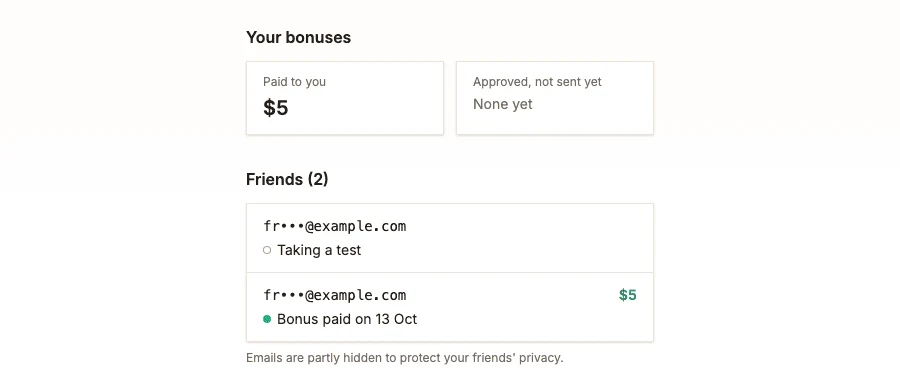
Your private note, other referrers and the referred people's full emails never appear on it.
Emails Usero sends
All three go from notifications@usero.io on your behalf. Replies go to the Reply-to address in your project settings, or to
the account owner's email when that is empty, so a referrer who replies reaches your team.
| Subject (for a project called Acme) | Sent to | When |
|---|---|---|
| Acme would like your help finding testers | The referrer | Once, when you add them |
| Acme sent your $5 referral bonus | The referrer | When you mark a bonus paid |
| Your Acme referral bonuses now go to a new email | The referrer's previous payout address | When a referrer changes their payout email |
The invite covers the open tests with their reward, bonus and cap, how it works in three steps, the link printed in full, and a line that bonuses come from you and not from Usero. The bonus email names the referred person (partly hidden), the test, the amount, where it was sent and the running total. The payout-change email exists so a forwarded status link cannot quietly redirect someone's bonuses.
Nothing is sent when someone signs up, when a bonus becomes owed, when it needs review, or when it is cancelled. Referred people get only the normal test emails.
Your own email about a finished session names the referrer when the participant was referred, for example "Referred by Sam Okafor (sam@example.com). A $5 referral bonus becomes due when you pay this session." The second sentence shows only while the bonus is not yet owed.
Run referrals from an agent
Every step above works through the Usero MCP server, so Claude Code, Cursor or any MCP client can run referrals for you.
| Tool | What it does |
|---|---|
add_referrer |
Adds a referrer (name, email, optional private note), emails their link, returns shareUrl. |
list_referrers |
Your referrers, newest first, with whether the link is on, friendsReferred and shareUrl. |
set_referrer_disabled |
Turns a link off or on. Off returns how many unpaid bonuses were cancelled (voided). |
list_referrals |
Referred people, needs-review first, with flags in words, the bonus and where to send it. |
review_referral |
approve or reject a flagged bonus; disableReferrer: true with a reject also turns the link off. |
release_referral_bonus |
Marks an owed bonus paid and emails the referrer. Agents confirm with you first. |
create_user_test and update_user_test take referralBonusDollars (an empty string turns referrals off) and
referralCapPerReferrer. get_user_test, list_user_tests and the session tools return the referral settings, counts and who
referred whom.
Prompts that work well:
- "Turn on referrals for the checkout test with a $5 bonus, at most 3 per person."
- "Add Priya Shah, priya@example.com, as a referrer. Note: runs the Shopify partners Slack."
- "Which referral bonuses need review, and why?"
- "Pay the bonuses that are ready on the checkout test." The agent lists each one (referrer, referred person, amount) and waits
for your yes before calling
release_referral_bonus, because marking paid emails the referrer.
{
	"name": "add_referrer",
	"arguments": {
		"clientId": "client_abc123",
		"name": "Priya Shah",
		"email": "priya@example.com",
		"note": "Runs the Shopify partners Slack"
	}
}
Troubleshooting
- The Referrals switch is greyed out. The test has no reward. Set one first.
- A referral link shows no tests. None of your tests has referrals on and is reachable: check the bonus is set, and that the test is open to anyone or has a published screener. Invite-list tests never show.
- Someone used a link but no referral appeared. One of the rules in Caps and fraud checks applied: most often they had already taken one of your tests, or another referrer got there first.
- A bonus did not appear after you paid the session. It usually shows at once. If a write failed partway, a sweep every 15 minutes picks up paid sessions from the last 7 days and fills in the missing bonus.