Jira issue sync
Send feedback to Jira with the replay attached, and let the status follow back.
Connect a Jira Cloud project with OAuth. Any feedback item becomes a Jira issue with one click, carrying the session replay and the person who reported it, and when the issue reaches Done the feedback resolves. No status mapping to build.
Plenty of engineering teams run on Jira, and most feedback tools treat Jira as a one-way send. A ticket goes out and the feedback board never hears back, so the person who asked never hears either.
The feedback tool and Jira disagree within a week. Someone copies a request into a Jira issue, an engineer closes it a sprint later, and the feedback item sits open in the inbox until a PM notices during a cleanup. The other direction is worse: the request gets resolved in the feedback tool because the PM heard it was fixed, and the Jira issue sits in the backlog. Tools that do sync status usually ask you to map every workflow status by hand first, and a Jira site with four projects has four workflows. The person in the middle ends up maintaining the mapping instead of reading feedback. The engineer, meanwhile, opens the ticket and gets a paraphrase. The replay, the console log, and the name of the user who hit it are back in the other tool.
How it works
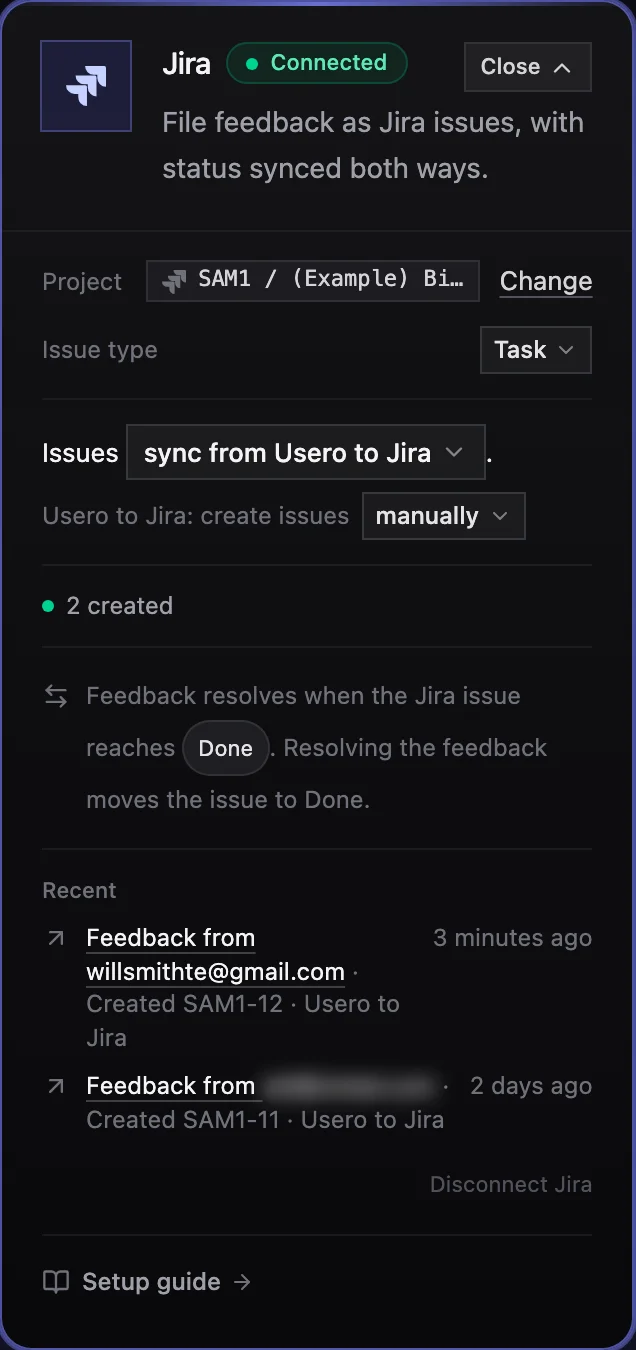
Jira issue sync in Usero.
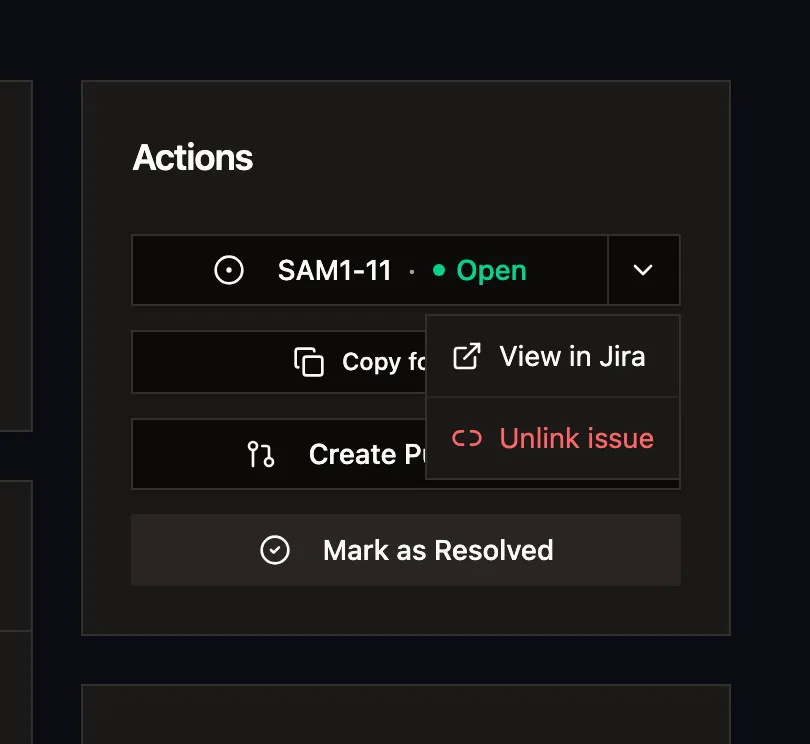
Disclosure: I build Usero, so weigh that. You connect Jira with Atlassian OAuth from the Jira card on your Integrations page, pick one project, and pick the issue type Usero should file (Task on most projects). That card is the whole control panel. Every feedback item then gets a Create issue button that files the issue in that project with the feedback text, a link to the session replay, and the reporter, and links the two so the item shows a chip like ACME-142 with its state. Status follows both ways with nothing to configure, because Jira sorts every status in every workflow into one of three categories, and Usero reads the Done category: an issue reaching Done, Won't Do, or any other done-category status resolves its feedback, and resolving feedback in Usero transitions the issue to a done status, which you pick on the card when the workflow has more than one. The card shows which statuses count. Jira Cloud only. Jira issues are not imported into the inbox yet; that is the next piece. Comments do not sync.
Create the issue from the feedback page, with the replay and reporter attached
Click Create issue on any feedback item and Usero files it in your Jira project. The description carries the feedback text, the page it came from, the name and email of the person who reported it, any custom data you pass (plan, seats), and a session replay link that opens at the moment they sent it, so the engineer opens a ticket that shows the bug instead of describing it. Automatic creation for every new feedback item, or for bugs only, is one dropdown on the card. Manual is the default.
Status follows both ways, zero setup
Every Jira workflow puts each status in a category: To Do, In Progress or Done. Usero uses that instead of asking you to map statuses. Move the issue to any Done-category status and the linked feedback resolves. Resolve the feedback in Usero and the issue transitions to a done status; when the workflow has more than one, the card lets you pick which. Reopen either side and the other reopens.
Your coding agent can open one over MCP
The Usero MCP server exposes create_issue with tracker set to jira. An agent in Claude Code or Cursor that has just read a feedback item can file the Jira issue itself and return the key, through the same path as the dashboard button, so the link and the status sync are the same.
One card, one project, a Recent list you can check
The Jira card holds the setup end to end: site, project, issue type, the statuses that resolve feedback, the created count, and a three-line Recent list of real events. If the account that connected is not a site admin, the card says so and gives your admin the three lines they need to add the webhook by hand.
The demand comes with the issue
If the feedback came from a public board post with 2 or more votes, the Jira issue opens with a Demand section: votes, companies, MRR, the must-have count and two voter quotes, dated, never an email address. The engineer sees who asked without opening Usero.
The honest objection
Our Jira workflows are custom. Will a status-category sync get them wrong?
Possibly, and the card shows you before it matters. Whatever your workflow calls its end states, Jira files each one under a category, and the Jira card lists the Done-category statuses it found in your project as chips, so you can see what will count before the first issue moves. If your workflow has no Done-category status at all, the card says so in amber and nothing resolves until you add one in Jira. Statuses outside the Done category do nothing. What it cannot do is treat one Done-category status as not done: if Won't Do lives in your Done category, it resolves feedback too. The fit is worst for teams that need Jira issues flowing into the feedback inbox, which Usero does not do yet; if that is the direction you need today, Linear and GitHub have it.
FAQ
Quick answers about jira issue sync.
How do I connect Jira to Usero?
Open the Jira card on your Integrations page, click Connect Jira, and approve the Usero app on the Atlassian consent screen. Then pick the project, and the issue type if the default is not right. One Jira project per Usero project.
Does it work with Jira Server or Data Center?
No. Jira Cloud only, through Atlassian OAuth.
Do Jira issues come into the Usero inbox?
Not yet. The sync runs from Usero to Jira: feedback becomes issues, and status follows both ways for those issues. Importing existing Jira issues into the inbox is the next piece. Linear and GitHub already import.
Which Jira statuses resolve the feedback?
The Done-category statuses in your project workflow, by default all of them. Jira puts every status in a category (To Do, In Progress, Done), so nothing needs mapping. The Jira card shows the ones that count. Other statuses leave the feedback open.
Does resolving feedback in Usero close the Jira issue?
Yes. Resolving a feedback item transitions its linked issue to a Done-category status; if the workflow has more than one, the card has a select for which. Reopening the feedback transitions it back.
Why does the card ask for a Jira site admin?
Usero registers a webhook on your site so status changes in Jira reach Usero. Registering it needs site admin rights. If the account that connected is not an admin, creating issues still works, and the card gives your admin the webhook URL, the two events, and the JQL filter to add it by hand in Settings, System, Webhooks.
Can I run GitHub or Linear at the same time as Jira?
All three can be connected on the same project. Only one tracker can have the Usero-to-tracker direction on at a time, and Create issue goes to that one. Choosing a Jira project takes it over, and the other cards say so.
Do comments sync?
No. The sync carries the issue and its state. Comments stay in Jira, and the feedback item keeps its own thread in Usero.
Turn that feedback into a pull request.
Free tier. No credit card. Two-minute install. The AI opens the PR, you merge it.
Keep reading
- Connect Jira and set up issue sync (setup docs)->
- Best user feedback tools (2026)->
- Widget Editor->
- Person profiles->
- AI user tests->
- Demand threshold auto PR->
- Sentry Integration->
- Session Replay->
- AI Replay Scanner->
- Traffic source capture->
- AI-authored GitHub PRs->
- MCP server for Claude Code and Cursor->
- Slack feedback capture->
- Forms->
- Feedback clustering->
- App store review import->
- Chrome extension->
- Discord feedback capture->
- Email forwarding->
- Intercom integration->
- GitHub issue sync->
- Feedback API->
- User testing->
- User test referrals->
- Public roadmap and feedback board->
- Chrome Web Store review import->
- Unified feedback inbox->
- Changelog->
- Revenue-weighted prioritization->
- Evidence quotes on clusters->
- Survey Score Over Time->
- Notion integration->
- Linear issue sync->