Usero Journal
Jira Customer Feedback: Get User Requests Into Jira With the Customer Attached
If your team lives in Jira, customer feedback has to end up there to get built. The hard part is getting it there with the customer still attached, and hearing back when it ships.
The version I see most at small teams: engineering runs sprints in Jira, and feedback lands everywhere else. A support chat, a Slack channel, a board, an email to the founder. Once a week the PM reads through it, picks the things that look real, and types them into Jira as new issues. The issue says “Export button hard to find”. It does not say who asked, what page they were on, or that four other people said the same thing in different words.
Then the issue gets done in a sprint and moves to Done. Nobody goes back to the Slack thread. The customer who asked finds out when they stumble on it, if they ever do.
Where does customer feedback go in a Jira team today?
These are the setups I come across, roughly from cheapest to most involved.
| Approach | Who writes the issue | Customer attached | Status back to the feedback |
|---|---|---|---|
| Paste into Jira by hand | The PM | If they remember the link | No |
| Jira Service Management portal | The customer, as a request | Yes, on the request | Only if an agent links a dev issue |
| Jira Product Discovery | The PM, as an idea with insights | As a note someone adds | Inside Jira, not to the customer |
| Canny or Featurebase plus Jira | Pushed from a board post | Yes, the voters | Yes, through status rules you set up |
Pasting by hand is free and it is what everyone starts with. It also depends on one person having a quiet afternoon every week, and the link back to the customer is the first thing to go.
Jira Service Management is built for support desks. Customers file requests through a portal, agents work a queue, and an agent can link a request to an issue in the dev project. That suits a team with a support function and agent seats to pay for. It does not put a feedback button inside your app, and nobody votes on anything.
Jira Product Discovery is the PM’s side of Jira. Ideas, prioritisation fields, and insights attached to each idea. It is a good place to decide what to build. The insights are added by your team though, from Slack or a browser extension, so the user’s words arrive after someone has read them and decided they count.
Canny and Featurebase both push board posts into Jira and sync status back. The catch is the setup. You map statuses one by one: this Jira status sets that board status, and in Featurebase the rules are per board. That is flexible, and it is also a grid somebody has to keep up to date every time the Jira workflow gets a new column. Featurebase also keeps its Jira integration on the Growth plan, $29 per seat per month.
What should a Jira feedback integration do?
Four things. I would be wary of anything that skips one.
- Keep the customer’s words. The issue should quote what the user wrote, with the page and browser, and link back to the feedback so the engineer can see who reported it and watch what happened.
- One click from feedback to issue. If filing takes a copy, a paste and a new tab, it gets skipped on a busy day.
- Status both ways. Done in Jira closes the feedback. Closing the feedback moves the issue. Otherwise you have two lists that agree for about a day.
- No mapping homework. A Jira workflow can have a dozen statuses with names only your team understands. The integration should work on day one without you explaining each of them.
Why status category instead of a mapping?
Every Jira status belongs to one of three categories: To Do, In Progress or Done. Your workflow might call them Backlog, In QA, Shipped and Won’t Do, and Jira still knows Shipped and Won’t Do are both Done. The category is there on every workflow, including ones you have never seen.
So the only question a feedback tool needs answered is whether the issue is done. If it is, resolve the feedback. If it gets reopened, reopen the feedback. That works the moment you connect, and adding a new column to the workflow later does not break it.
What you give up: a mapping lets a public board say “In progress” the day an issue moves to In QA. Status category only tells you open or done. If your users watch a public roadmap closely and expect the in-between states, the mapping tools do that and Usero does not yet.
How Usero does it
I build Usero, so read this part knowing that. The Jira integration is the shape described above, for Jira Cloud.
- Connect with Atlassian OAuth. Pick the site if you have more than one, then one project and an issue type. One Jira project per Usero project.
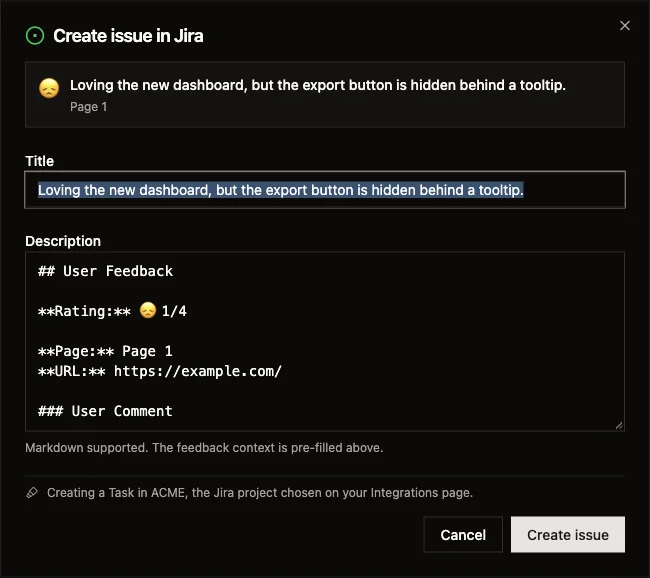
- Create issue on any feedback item. The title and description come pre-filled: the user’s comment quoted, their rating, the page and URL, the browser, and a link back to the feedback in Usero, where the reporter and the session replay are. You can edit before it goes. You can also have Usero create the issue automatically for every new item, or for bugs only.
- From an agent too. The Usero MCP server has a
create_issuetool, so Claude Code or Cursor can file the Jira issue for a feedback item without anyone opening the dashboard. - Status by category, both ways. Any Done-category status resolves the feedback. Resolving the feedback moves the issue to a Done status, which you can change on the card if your workflow has more than one. Reopening either side reopens the other.
One setup wrinkle. Usero registers a Jira webhook so status changes reach it, and Jira only lets a site admin do that. If the person connecting is not an admin, creating issues still works, and the card gives you three lines to hand to whoever is.
What it does not do yet: import existing Jira issues as feedback (the Linear and GitHub integrations do), link a feedback item to an issue that already exists, sync comments, or support Jira Server and Data Center. Setup is in the Jira docs, and the feature page has the rest.
If your users already have Jira accounts, say an internal tool, skip all of this and let them file straight into Jira. This is for the case where the people with the feedback will never see your Jira.
A quick way to check your current setup: pick the last five issues your team moved to Done that started as a customer request. How many of those customers were told? I would be curious what number you get.
Related Reading
- How to Sync User Feedback With Linear Issues, Both WaysRead
- Intercom Feature Requests: Get Them Out of the Inbox and Onto the RoadmapRead
- How to Close the Feedback LoopRead
Frequently Asked Questions
How do I get customer feedback into Jira?
Collect it somewhere customers can reach (a widget, a public board, a form, your support inbox), then turn each item worth building into a Jira issue that keeps the customer’s words and a link back to who said it. Doing that by hand works until the busy week. A feedback tool with a Jira integration makes it one click, and the good ones also resolve the feedback when the issue reaches Done.
Can Jira collect customer feedback by itself?
Partly. Jira Service Management gives customers a portal to file requests, which suits support. Jira Product Discovery gives the PM a place for ideas and the insights attached to them, added by the team. Neither gives your users a widget inside your app or a board to vote on, and plain Jira Software expects the person filing to have a seat.
How does status sync work between a feedback tool and Jira?
Most tools ask you to map statuses: this Jira status sets that board status, one rule per status, sometimes per board. Usero reads Jira’s status category instead. Every Jira status sits in To Do, In Progress or Done whatever your workflow calls it, so reaching any Done-category status resolves the feedback with nothing to configure, and resolving the feedback moves the issue to a Done status you pick on the card.
Does Usero import existing Jira issues as feedback?
Not yet. Jira issues stay in Jira. Usero creates issues from feedback and keeps their status in step both ways. The Linear and GitHub integrations do import issues.
Does it work with Jira Server or Data Center?
No, Jira Cloud only. The connection is Atlassian OAuth, which Server and Data Center do not offer in the same form.
Continue reading
How Canny and Featurebase Carry Customer Demand to the Engineering Ticket, and How We Built Ours
Canny shows voters, companies and MRR on a post, but every tracker integration is on Pro and the docs only describe a link on the issue. Featurebase’s Jira panel shows votes live, and its Copy as prompt includes the author’s email. We built a Demand block for issues and AI pull requests: companies, MRR, must-haves and two voter quotes for Linear, Jira and private repos, counts only for public GitHub repos, no emails ever.
6 min read
How Canny Groups Votes by Company, and How We Built Ours
Canny’s “Show votes grouped by company” request has 198 votes and was marked complete in August 2026 by pointing at a new Ideas view. We tested where Canny and Featurebase show the company behind a vote, then built a company count, a Most companies sort and a grouped voter list.
7 min read
How to Recruit Participants for User Research Without a Panel
Recruit participants for user research by writing a behavioural screener and working through sources cheapest first: your own users, their communities, referrals from people close to them, then a paid panel. How many to recruit, what to pay, and how to run a referral round without paying for junk sign-ups.
6 min read
Build a feedback loop your team actually uses
Usero collects, clusters, and turns user feedback into shipped fixes.
Get started free