How Featurebase Moderates a Feedback Board: Approving Posts Before They Publish Costs $59 a Seat
Canny’s own feedback board has had “post approval and moderation” open since 2018. It sits at 266 votes, and in the sweep I ran on 1 September it was the only request on that board that moved at all, 265 to 266. Sleekplan’s top two requests are guest submission and anonymity, with GDPR in the comments under both. Featurebase ships the thing. So I spent a night on how Featurebase does it, with Sleekplan as a second data point.
I want to see what an approval queue looks like once someone has built one, and what it costs.
First the honest bit. Both admin sessions were logged out when I sat down, the Featurebase test workspace (Compass Calendar, free plan) and the Sleekplan one, and I didn’t log back in. It wouldn’t have helped much anyway. Featurebase puts moderation on Professional at $59 a seat a month, Sleekplan puts it on Starter at $13 a month, and both test workspaces are free. So the queue itself, in both products, comes from their help centres and their own screenshots. The visitor side of the public boards and the pricing tables I watched live, and I’ll say which is which as we go. That pricing bit turned into the story. The teams that most need this, two or three people opening a board for the first time, are the ones on the free plan.
One note on colour: my Chrome runs Dark Reader. Both help centres are dark by design anyway, so the layouts are right but don’t trust the exact hues.
Start on the Featurebase board as a stranger. Seven seeded posts, votes on the right, New / Top / Trending, a Create A New Post button. Nothing tells you whether a review step exists, which is how it should be. Click Create A New Post and a “Sign up to continue” modal comes up where the composer would be: Continue with Google, Continue with Github, Sign in with email, Register with email, and a line underneath, “Sign up to post and vote.”
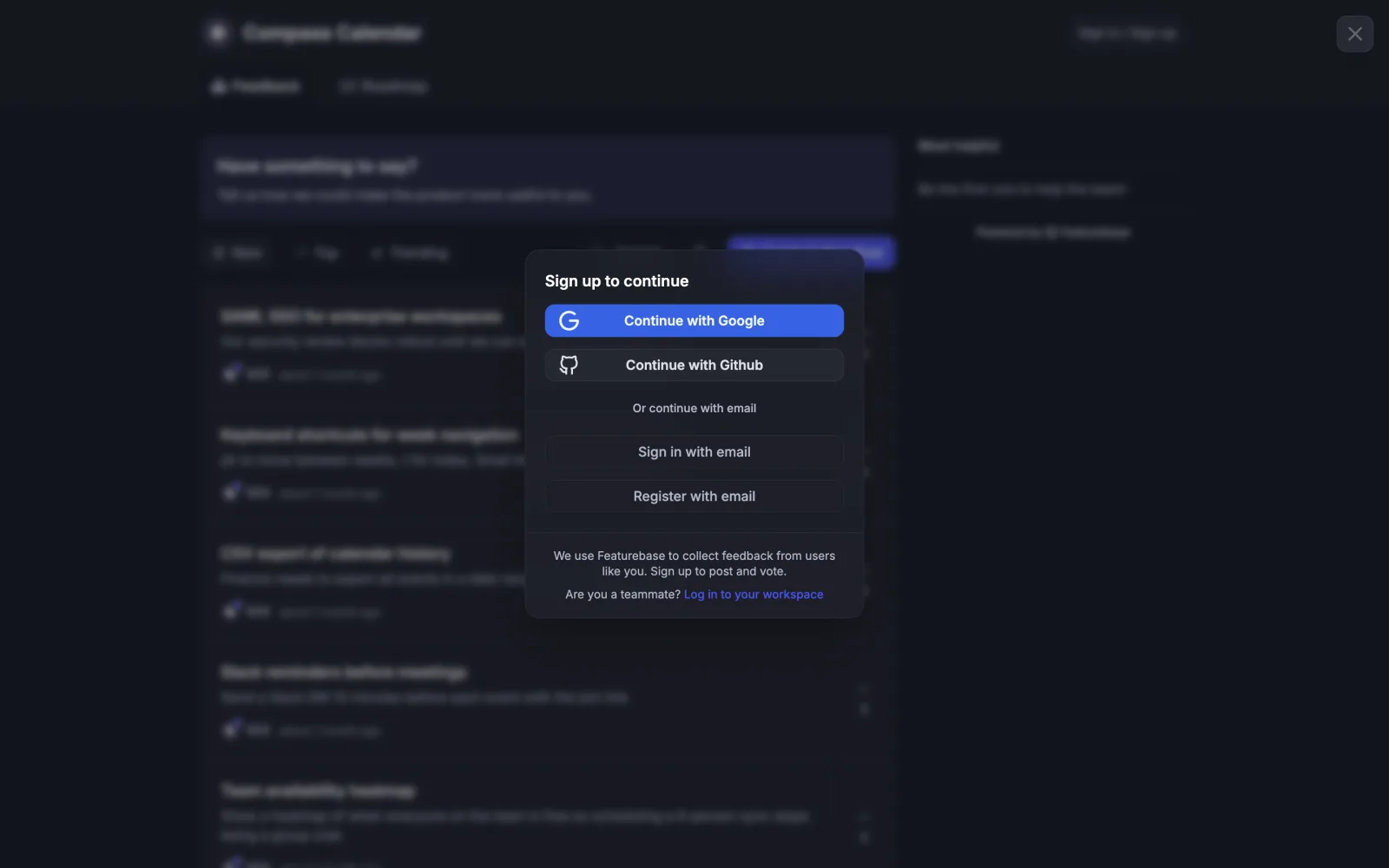
That is the default on a fresh workspace, and it matters for the queue. A stranger can’t reach the compose box, so on a default workspace the queue only ever holds posts from people who already made an account. The setting that lets anyone post without signing in (“No log-in actions”, under board privacy) is the one that gives a queue something to do, and it lives on the same $59 plan.
Turning moderation on, per their docs, is Settings, then Feedback & Roadmaps, then Portal settings, then Moderate. Five checkboxes on the panel: Anonymous Commenting, Post moderation, Comment moderation, Anonymous Upvoting, Anonymize user information. Post and comment moderation are two separate boxes, which makes sense, comments come in at a very different rate from posts. Tick either and “a Moderation tab will appear on the left-side menu of your Dashboard”, so a team that never turns it on never sees a dead nav item.
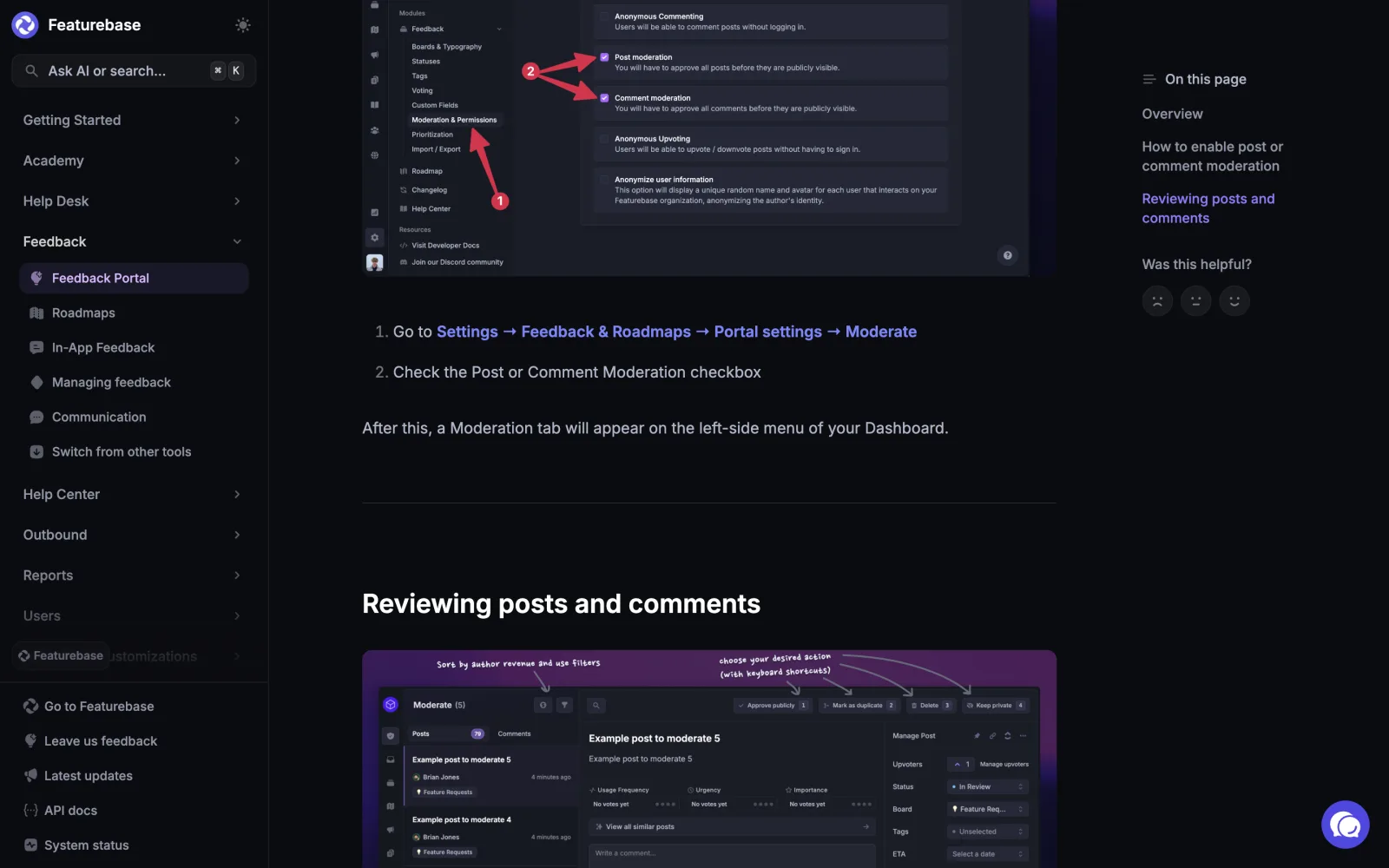
The queue is the part I’d have liked to touch. From their annotated screenshot: the header reads “Moderate (5)”, a Posts tab with a count pill (79 in their shot) and a Comments tab. Four buttons across the top right, each with its shortcut number printed on it. Approve publicly 1, Mark as duplicate 2, Delete 3, Keep private 4. Arrow keys move between posts. You learn the keyboard by using the mouse. I can’t think of another queue that prints them on the button.
The bigger thing is that the queue is the full post editor. The middle column has the post, the prioritisation inputs, a “View all similar posts” row and a rich text comment composer. The right rail has Status, Board, Tags, ETA, Assignee. So you can file the post, tag it, assign it and reply to the author before anyone else has seen it. Most queues make you approve first and then go find the post again to file it. And because the similar-posts row sits inside the review, you mark a duplicate with the candidates on screen instead of from memory.
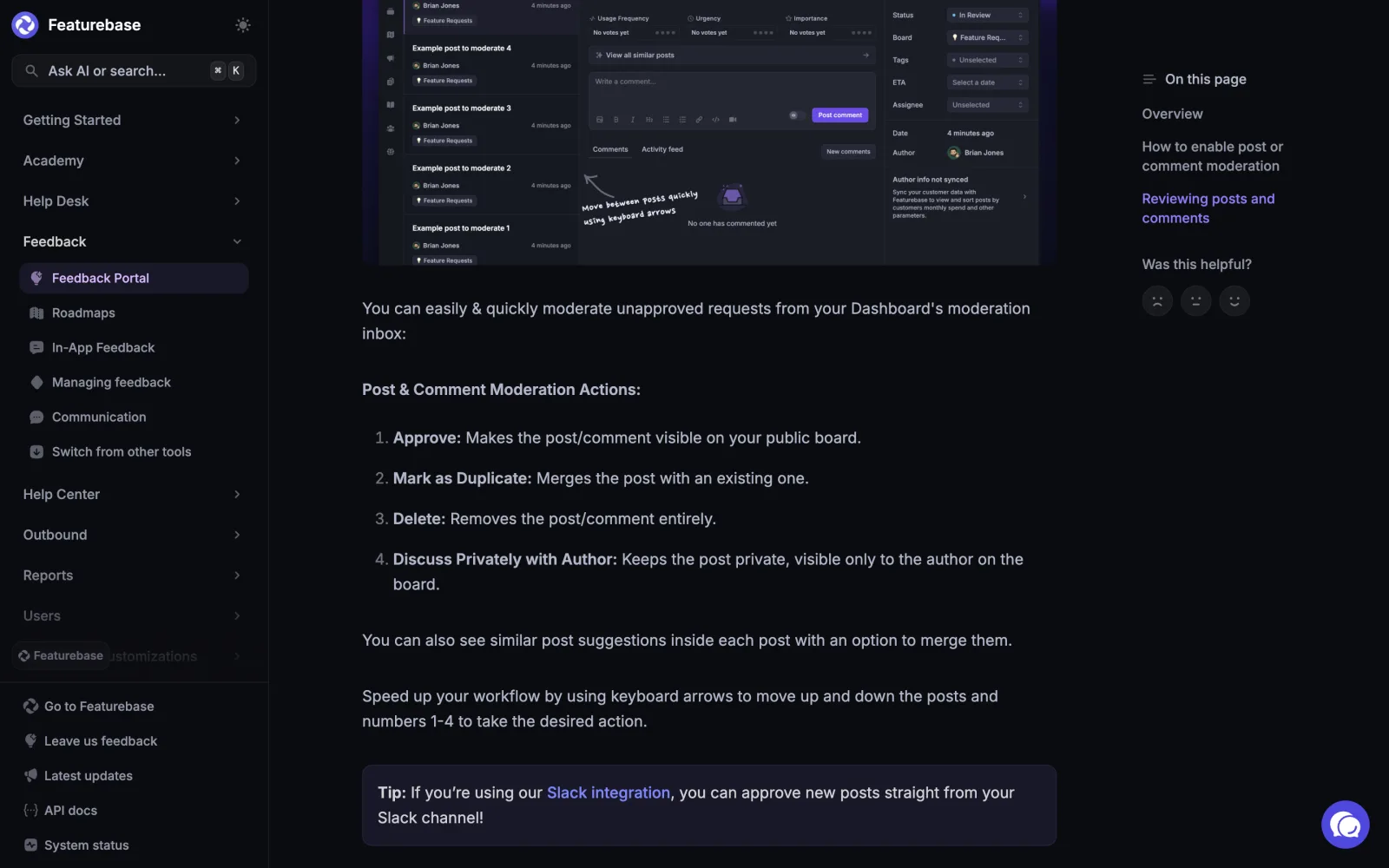
Keep private is the fourth option, and the one I wouldn’t have thought of. Approve/reject binaries push you toward deleting anything awkward. Keep private leaves the post alive for its author, comment thread and all, so there is somewhere to put “not for the public board, but I do want to talk about this”. The help article calls the same button “Discuss Privately with Author”, which is the clearer name for what you’d use it for.
Then the odd one. Two icons next to the title, annotated “Sort by author revenue and use filters”. Sorting a moderation queue by how much the author pays you. A queue needs a service order and highest paying customer first is a defensible one, and the right rail carries the upsell for their customer data sync right there (“Author info not synced”). I’m not sure how I feel about it and I keep thinking about it, which probably means it’s good.
The last tip in the article is Slack: “you can approve new posts straight from your Slack channel”. The notification and the action in the same place. Not tested, the workspace never got that far.
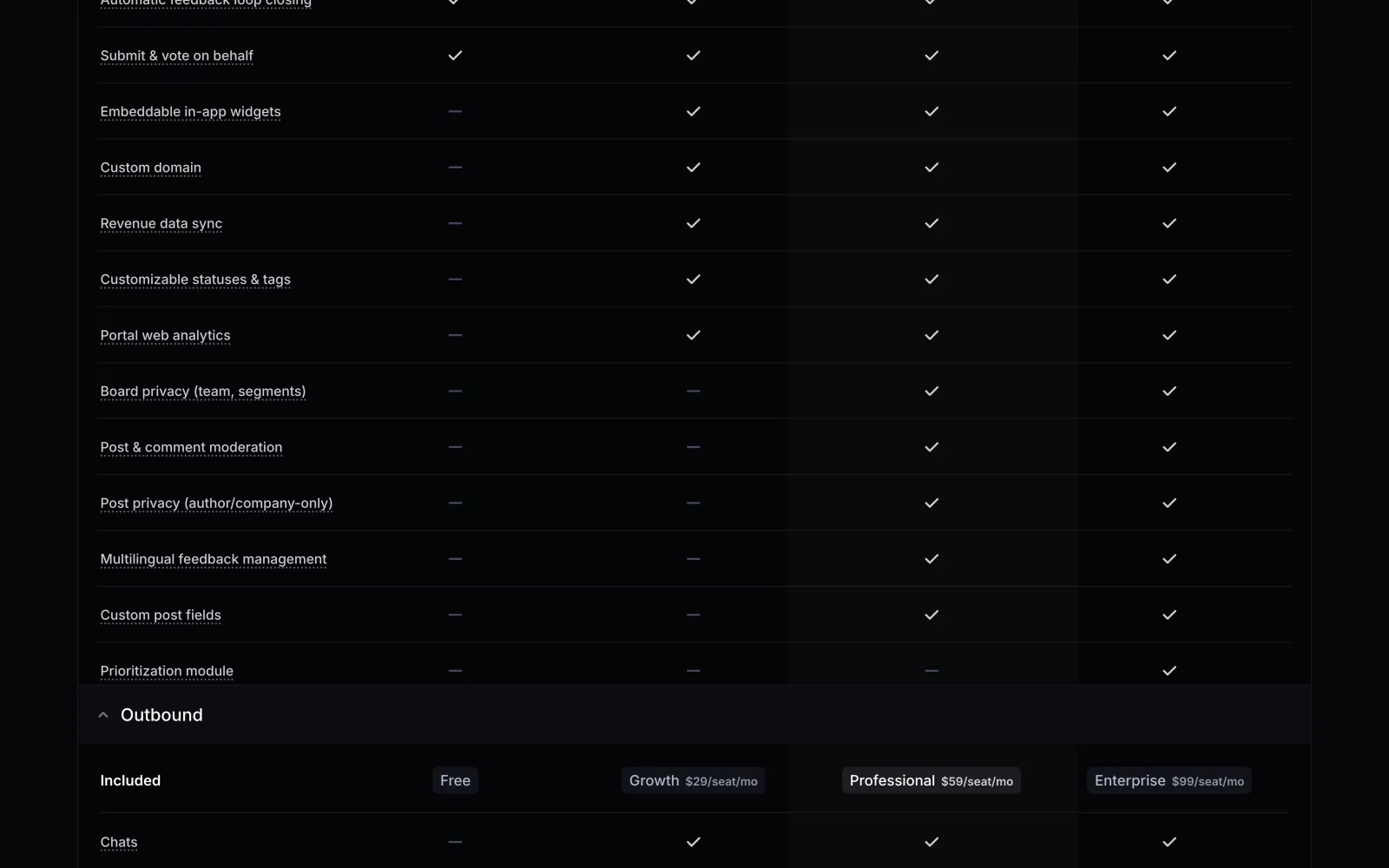
So what does it cost? Post & comment moderation is a dash on Free, a dash on Growth at $29 a seat, and a tick from Professional at $59 a seat a month, billed yearly. The whole privacy cluster moves together: board privacy, post privacy, multilingual. They’re selling “control over who sees what”, and moderation rides along in that box. I couldn’t see what the gate looks like from inside a free workspace, lock icon or upgrade modal, because I was logged out.
What does Sleekplan do with the same problem? The gate is $13 a month for the whole workspace rather than per seat, on Starter, and their docs are unusually good. Same two switches, post moderation and comment moderation. Then a field called Moderated words: a comma-separated list, empty means hold everything, populated means hold only submissions containing one of the words, case-insensitive. Their example list is spam, refund, competitor. That turns an all-or-nothing gate into a dial. A team can keep the post-appears-instantly feel and still catch a competitor’s name. It’s the idea I’d copy first.
Their queue is a top-level Review item in the sidebar with a count badge, and it’s shared with their AI feature. Tabs are All, Moderation and Sleek AI. The AI proposes merges, replies and votes, and those wait in the same list as user posts, so if you’re in there for one reason you clear the other for free. J and K to move, A to approve, R to reject, and the approve button is a menu: shift-A is approve and reply to the user.
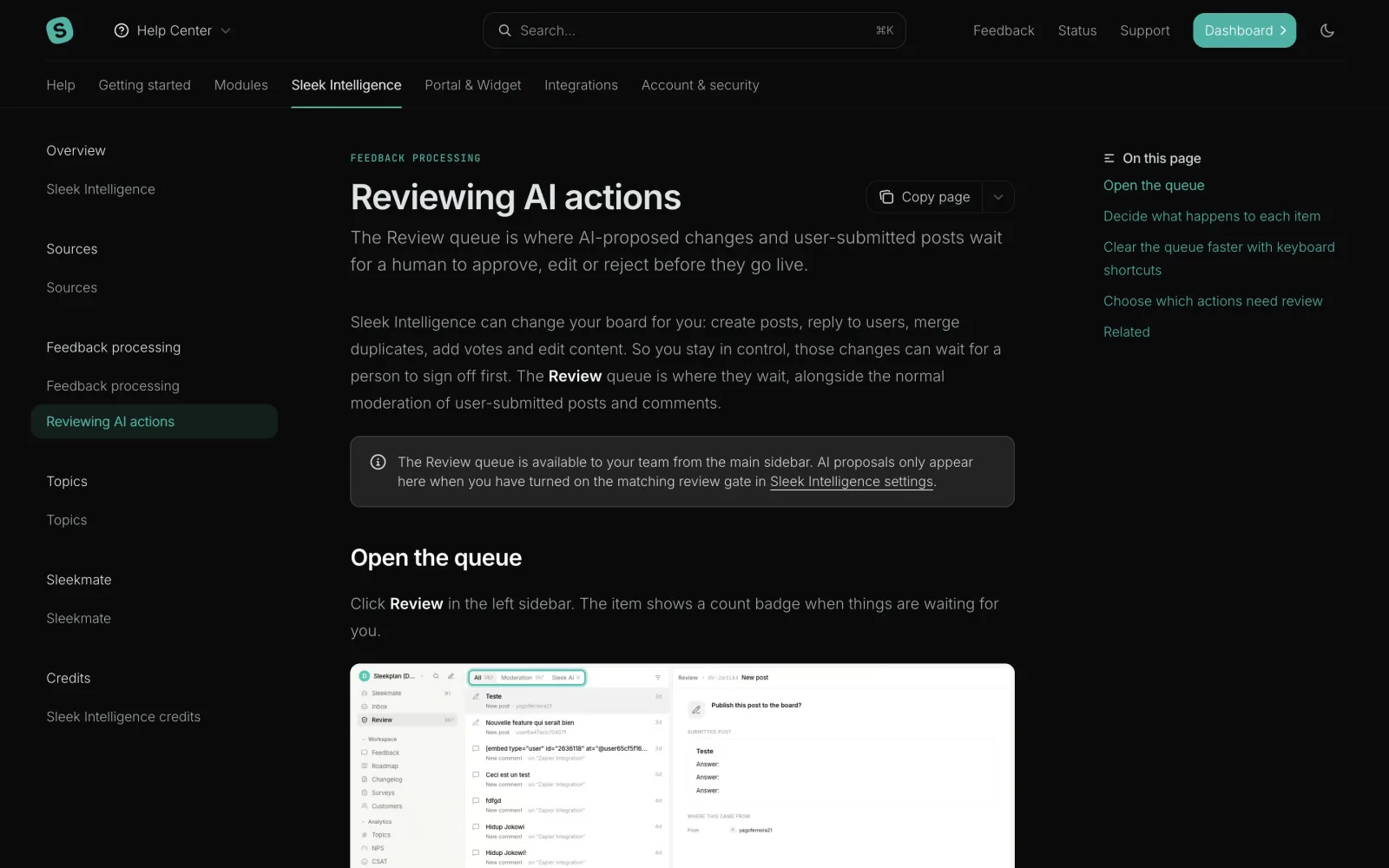
Their docs also warn to turn post moderation off before a bulk import, or the whole import lands in the queue. You can tell that one came in as a support ticket.
What’s missing from both? The author is never told. Neither help centre says the person who submitted the post hears anything when it’s approved, and on Featurebase’s Keep private the author sees their post sitting on the board with no way to know nobody else can. Nobody likes posting into a void, and an email on approve is one template. Sleekplan’s approve-and-reply is the closest either gets. Nothing says why an item was held, either. Featurebase routes its spam classifier into the same tab as “everything is pending because you ticked the box”, with no badge telling the two apart, and that one line is the thing that would speed up triage most. No bulk actions visible in either, and Featurebase’s own marketing shot has 79 posts waiting. Arrow plus 1 is quick, but it’s still one keystroke per post. No audit trail I could find. And the plan gate, which they share, at very different prices.
How we built ours
Verdict was build, and it shipped tonight on a branch. The reason is the pricing table more than the queue. A public board that publishes every stranger’s post the instant they hit submit is a board a two-person team won’t turn on, and guest posting is where board feedback enters our pipeline. So the approval step is what makes guest posting safe, and it’s on every plan, free included.
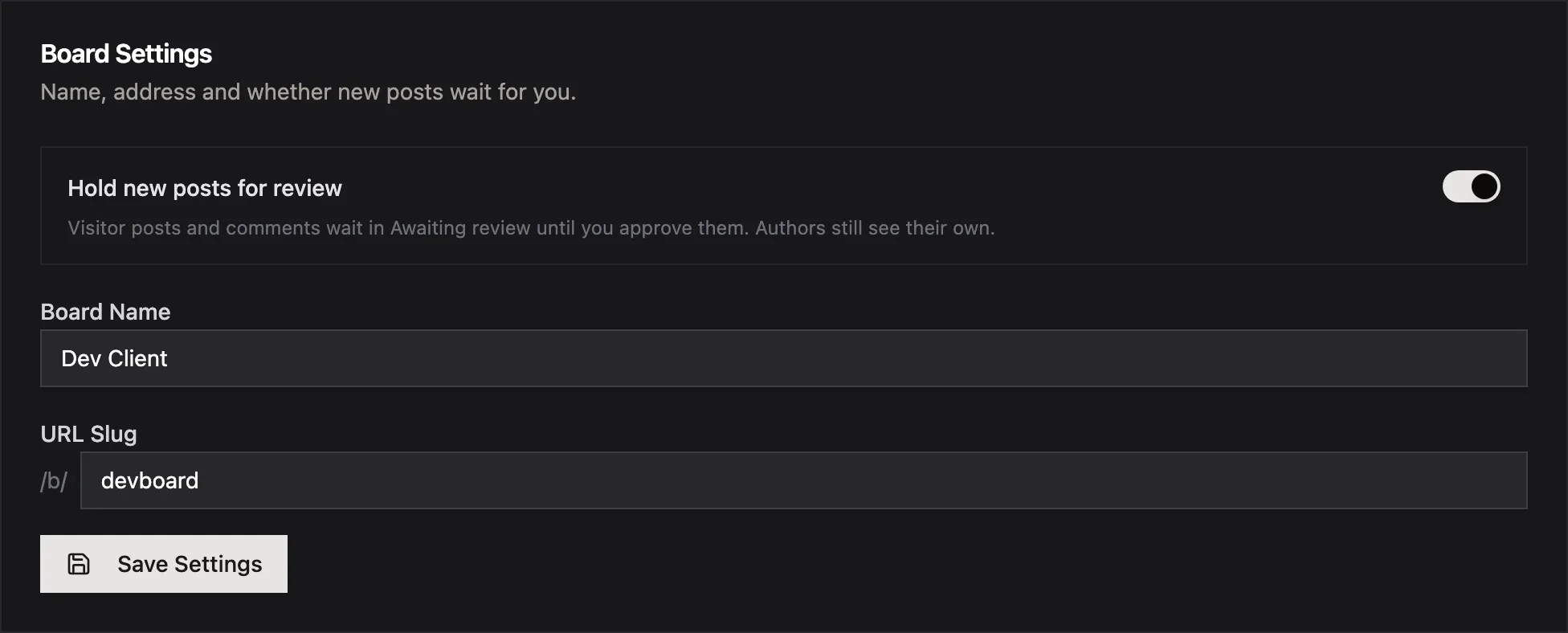
It’s one toggle, Hold new posts for review, in the board settings. Off by default, so nothing changes for boards that are already running.
Under it, three additive columns on posts and comments: moderationStatus, moderatedAt and authorHash. No new table, and the board query keeps its shape. A held post skips the feedback pipeline until it’s approved. Approve runs the same ingest path as any other board post, so it lands in the inbox, clusters with everything else, and can go to an AI-drafted pull request like feedback from the widget or Slack. Marking a duplicate merges it into the post you pick and it never touches the inbox.
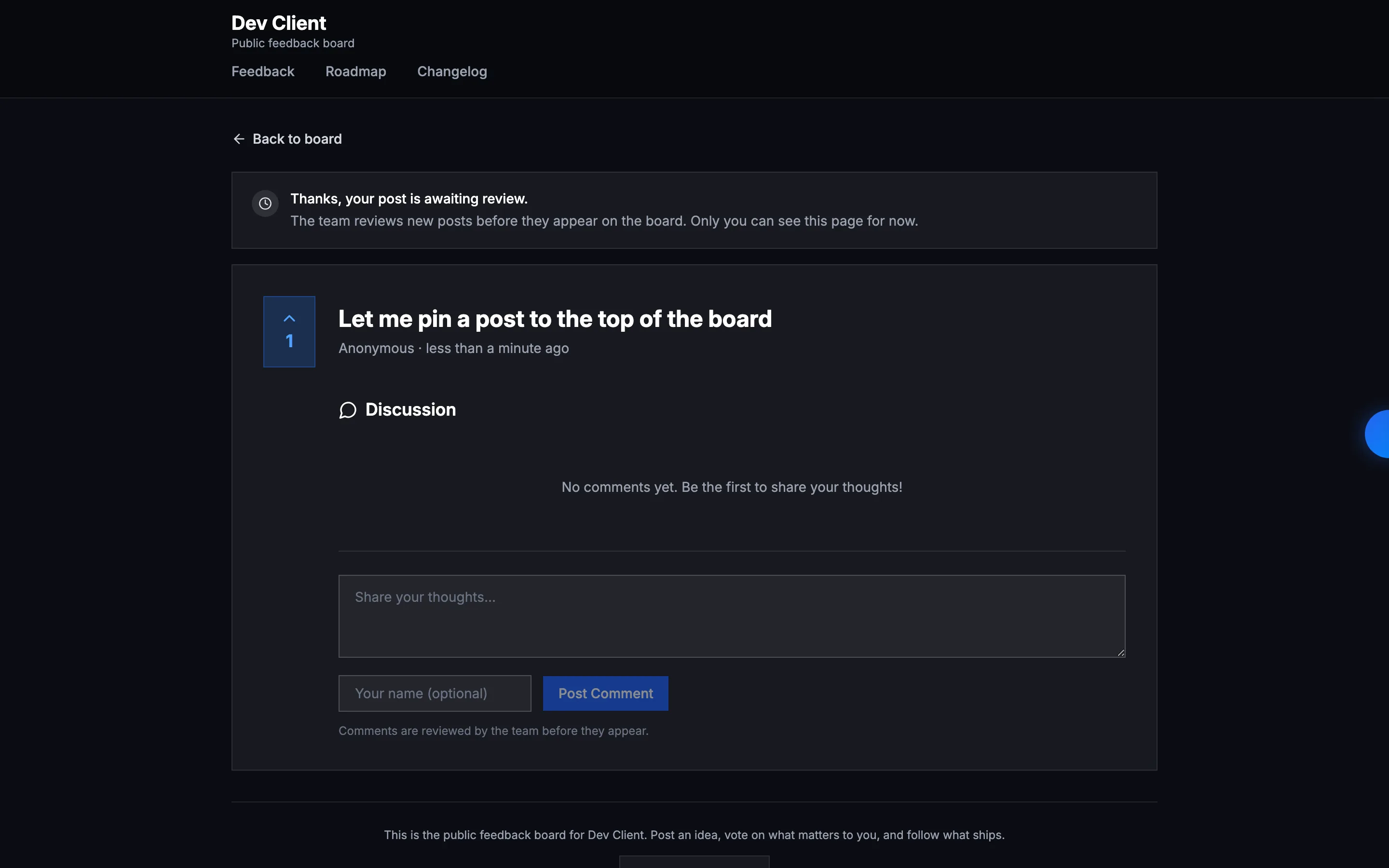
The author can see their own held post. We already set a cookie to dedupe votes, so the same cookie is the author hash, and opening the post URL with it shows the post under an awaiting-review banner: “Thanks, your post is awaiting review. The team reviews new posts before they appear on the board. Only you can see this page for now.” Anyone else gets a 404, and the board index, search and vote counts don’t know the post exists. A held comment shows only to its author, with an Awaiting review label next to it.
The queue is a section at the top of the board settings page rather than a new nav item. Each held post shows title, the first lines of the body, author and submitted time, with Approve, Duplicate and Reject in that order every time. The title opens the post as the author sees it. Held comments sit in the same list, labelled with the post they belong to, with Approve or Reject.
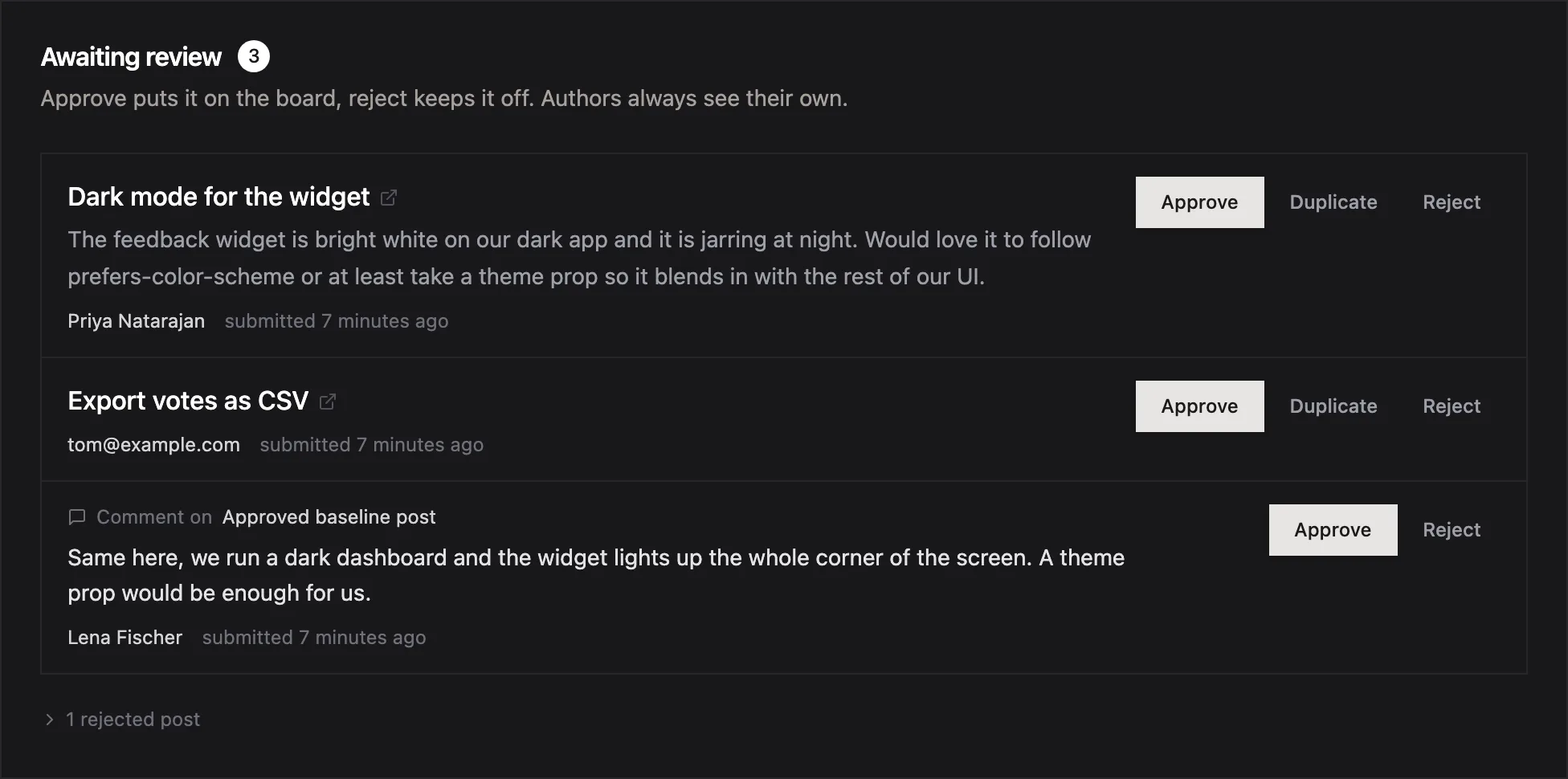
Approve emails the author “your post is live” with a link, if they left an email. That’s the gap in both competitors and it cost us one template. The post keeps its submission time on the board, so a post that waited three days says three days, not “just now”. Reject hides the row without deleting it. Rejected posts sit in a collapsed list with a Back to queue action, which does what it says. Nothing is emailed on reject.
Two MCP tools went in with it: list_pending_board_posts returns what is waiting and moderate_board_post approves or rejects a post or comment. So an agent can clear the queue from the editor, or you can ask it “anything waiting on the board?” before standup.
The smoke run: turn the setting on, a visitor submits, the author gets a 200 with the banner and a stranger gets a 404, the index doesn’t list it, the admin approves, the stranger now gets a 200 and the row shows up in feedback with source board. Then the same for a comment, then reject, restore, mark duplicate, and marking a post as a duplicate of itself comes back 400. Then the two MCP tools over a real API key. Fifteen steps, all green.
Not built yet: reason chips (“flagged as spam”, “first post from this person”), duplicate suggestions from our clustering (we already compute the similarity, so this is the obvious next one), bulk actions, an audit log of who approved what, and Sleekplan’s moderated-words list. That last one is the one I want most, so the queue only needs a look when a word trips it, not every morning.
The open question is the shortcut numbers on the buttons. Featurebase’s 1-2-3-4 is the best thing in their queue and it’s about four lines of code. Probably next week.
Frequently Asked Questions
How does Featurebase moderate posts on a feedback board?
Two checkboxes under Settings, Feedback & Roadmaps, Portal settings, Moderate: post moderation and comment moderation. Once either is on, a Moderation tab appears in the dashboard with a queue. Each pending post opens in the full post editor, and there are four actions with keyboard numbers printed on the buttons: Approve publicly (1), Mark as duplicate (2), Delete (3), Keep private (4). The queue can be sorted by author revenue, and their Slack integration can approve from the channel.
Is post moderation free on Featurebase or Sleekplan?
No on both. Featurebase lists Post & comment moderation as a dash on Free and on Growth ($29 per seat per month) and a tick from Professional ($59 per seat per month, billed yearly). Sleekplan puts Moderation on Starter at $13 a month for the workspace, with a dash on the free Indie plan.
Does the author find out when their post is approved or rejected?
Neither help centre says so. Featurebase describes Keep private as leaving the post visible only to its author, with nothing about telling them. Sleekplan has an approve-and-reply shortcut, which is the closest either gets. On Usero, approving a held post emails the author a short "your post is live" note with a link, if they left an email. Rejecting is silent.
How does the Usero approval queue work?
Turn on Hold new posts for review in the board settings. New visitor posts and comments are then held: they do not show on the board, in search or in vote counts until you approve them. The author can open their own held post at its URL and sees an awaiting-review banner; everyone else gets a 404. The queue sits at the top of the board settings with Approve, Reject and Duplicate per post. Approve publishes the post with its original submission time and mirrors it into the feedback inbox, so it clusters and can go to an AI-drafted pull request. Two MCP tools, list_pending_board_posts and moderate_board_post, let an agent clear the queue. It is on every plan, including free.
Continue reading
How Canny and Featurebase Carry Customer Demand to the Engineering Ticket, and How We Built Ours
Canny shows voters, companies and MRR on a post, but every tracker integration is on Pro and the docs only describe a link on the issue. Featurebase’s Jira panel shows votes live, and its Copy as prompt includes the author’s email. We built a Demand block for issues and AI pull requests: companies, MRR, must-haves and two voter quotes for Linear, Jira and private repos, counts only for public GitHub repos, no emails ever.
6 min read
How Canny Groups Votes by Company, and How We Built Ours
Canny’s “Show votes grouped by company” request has 198 votes and was marked complete in August 2026 by pointing at a new Ideas view. We tested where Canny and Featurebase show the company behind a vote, then built a company count, a Most companies sort and a grouped voter list.
7 min read
How to Recruit Participants for User Research Without a Panel
Recruit participants for user research by writing a behavioural screener and working through sources cheapest first: your own users, their communities, referrals from people close to them, then a paid panel. How many to recruit, what to pay, and how to run a referral round without paying for junk sign-ups.
6 min read
Build a feedback loop your team actually uses
Usero collects, clusters, and turns user feedback into shipped fixes.
Get started free