How Canny’s Vote on Behalf Works: An Add Voter Link, a Priority Pill and No Note on the Vote
Most of the feature requests a small team gets never touch the board. They arrive in a support ticket, a sales call, a reply to an onboarding email. The board shows 0 votes on the thing five customers have asked for. Canny’s fix for this is a link on every post called Add voter: an admin attaches the customer to the post, the count goes up, and the customer gets emailed when the status changes. We were about to build the same thing, so I spent an evening on how Canny’s works end to end.
First, an honest note on the evidence. The plan was to do this in our own test workspace, shredcrew.canny.io, on the Free plan. When the run started, the admin session in Chrome had been logged out, the admin URL 302’d to canny.io/login, and the rule for these nights is no logging back in mid-run. So the public board below was observed live, and the admin side (the Add voter link, the voter list, the priority dropdown, the status email) comes from Canny’s help centre, their API reference and their pricing page, using their own product screenshots. I have marked each shot as one or the other. One more caveat: my Chrome runs Dark Reader and Canny honours a browser-theme cookie, so my live screenshots are colour-shifted dark. Canny’s own screenshots are in their light theme and are the ones to trust for hues.
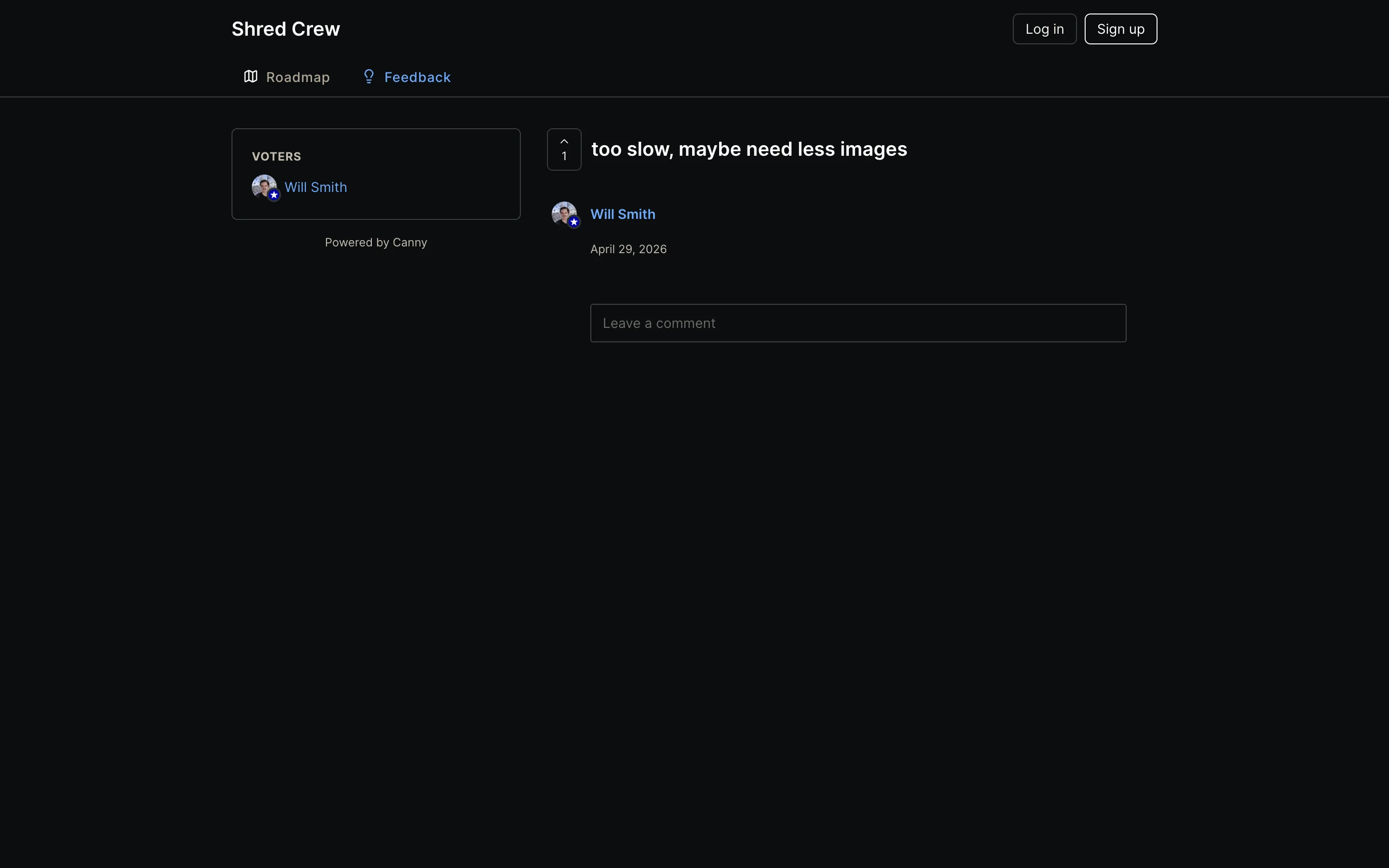
This is the post page on our board before anything happens. Two things matter for the feature. The count sits in a chevron box left of the title. And a VOTERS panel in the rail lists the voter by name and avatar, to a logged-out visitor. Canny’s help centre says on-behalf votes are treated differently: “Only teammates will be able to see these voters. Your users can see that someone has voted (because the score increases) but not the identity of this person.” I could not check that split live, so it stays documented.
What does the admin see?
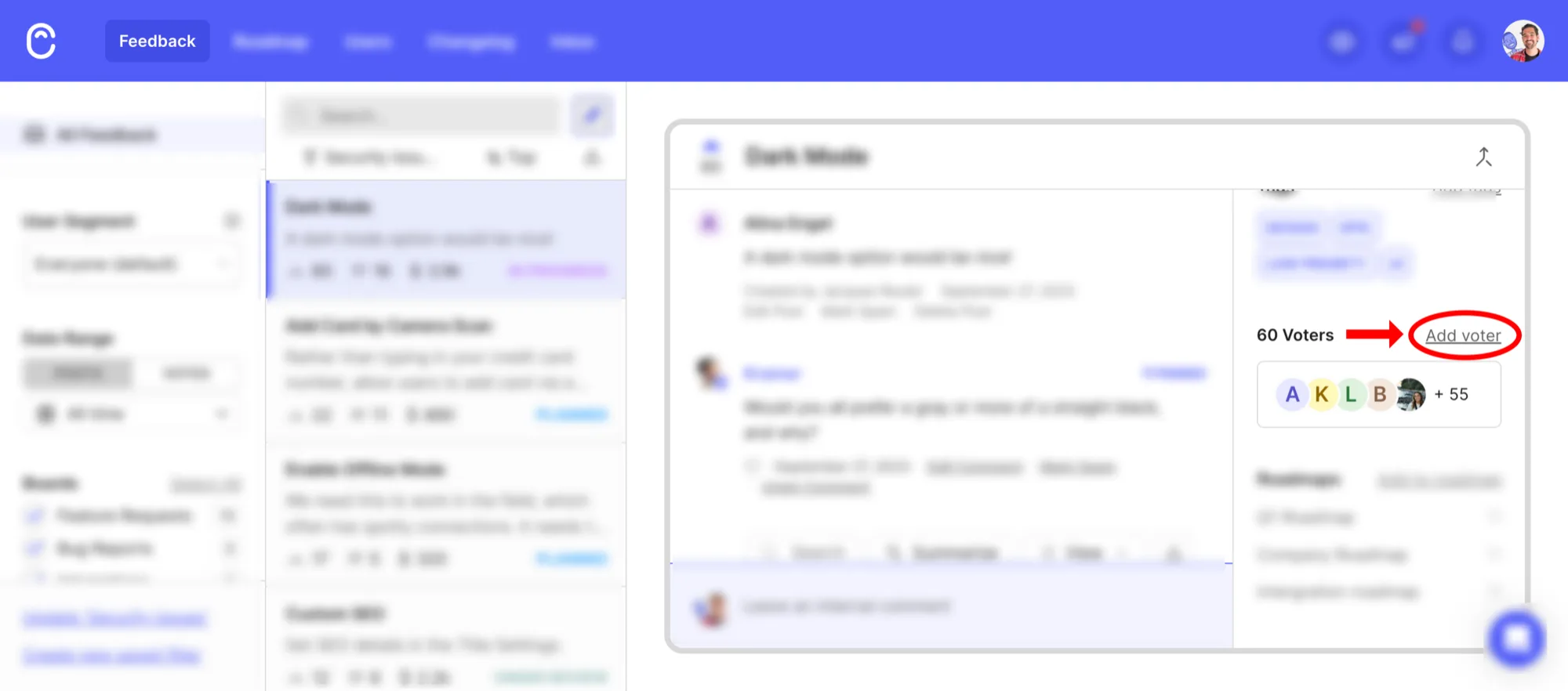
The entry point is an underlined text link next to the voter count, above a row of avatar chips. Click it and you search the tracked-user list, which is everyone who has ever posted, voted or commented plus anyone pushed in via Identify, Segment, the API or a CRM sync. If the person is not there, you create them inline with a name and an email. Canny does not screenshot the search modal anywhere in the help centre, and their Users & Companies article describes the create form as “Create a user: add a user manually [confirm exact fields: name, email]”, an editor’s placeholder that is live on their site. So name plus email is the field list until I see it. Any on-behalf voter becomes a tracked user, which matters for pricing later.
Adding is one of five ways in. The dashboard link, a Chrome extension that opens on a HubSpot or Intercom record with the person prefilled, the API (votes/create with a voterID and a byID), Autopilot, which reads your conversations and suggests votes to add, and the Slack, Intercom, Zendesk, HubSpot and Salesforce integrations. The sales team never has to open Canny. I like that a lot. We are not building four of those five this week.
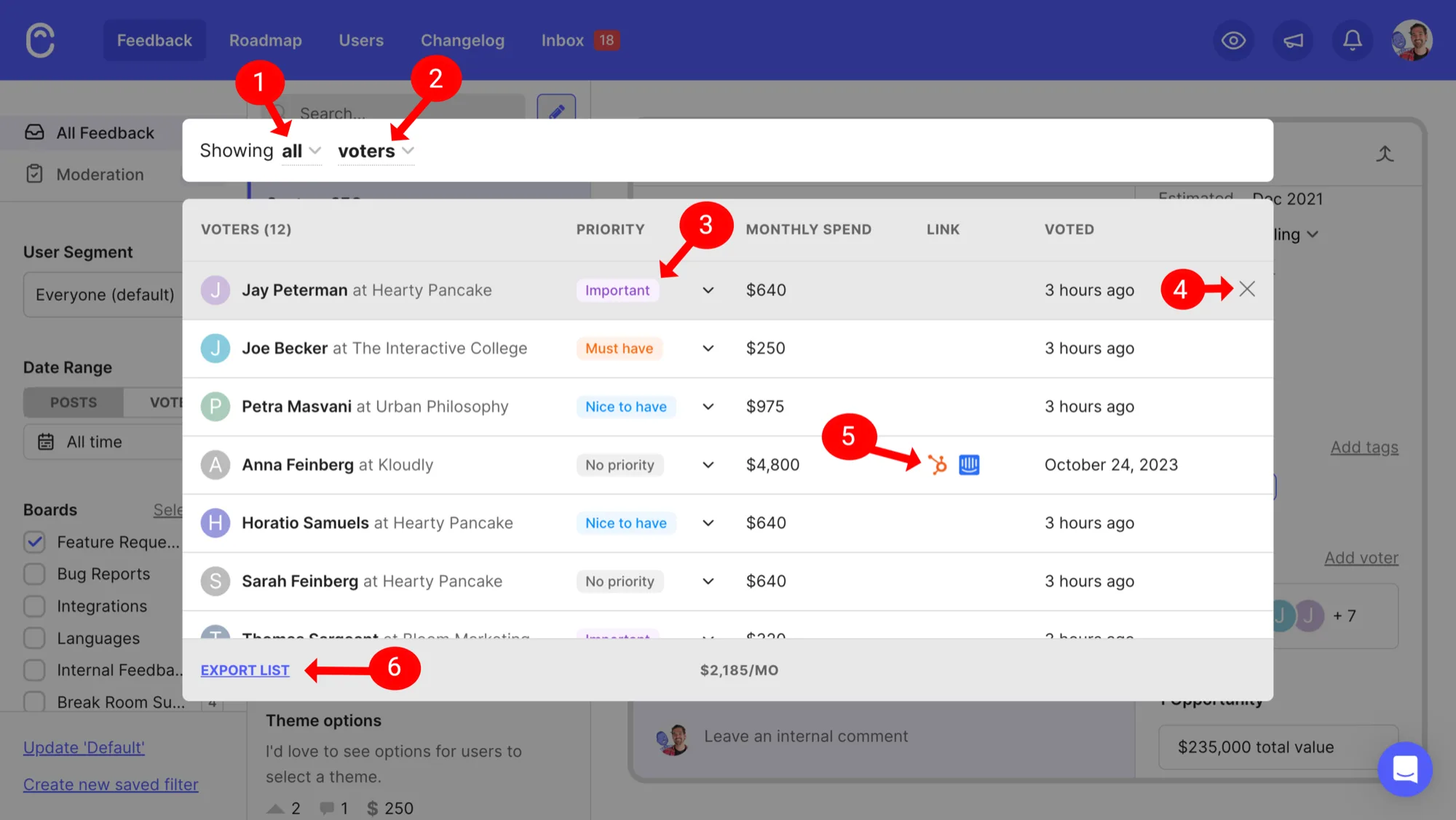
Expand the chips and you get the voter list, which is a sales table. Name at company, a priority pill, monthly spend, a HubSpot or Intercom icon back to the source conversation, when they voted, and a footer summing the spend at $2,185/mo for 12 voters. Export at the bottom. On the Business plan the same rail gets an Opportunities block with total deal value. If a PM is arguing for a roadmap item, this is the table they want, and it is one click from the post.
The priority dropdown is Nice to have, Important, Must have, or No priority. Admin-only, end users never see it, and the API maps the three values to votePriority 0, 10 and 20. Featurebase, for comparison, asks for three fields per voter (importance, urgency, frequency). I prefer Canny’s one pill; three fields per person is a form nobody fills in on a call.
The X at the end of the row removes the vote, and it “will not appear if the person voted on their own behalf”. Admin-added votes are removable, self-cast votes are not. That is the right way round, and it keeps the public count honest.
Where does the reason go? Someone says “we’ll churn without this” on a renewal call, and I want that sentence next to their name. There is no note on the vote. The API vote object is by, voter, votePriority, zendeskTicket and nothing else. Canny’s answer is the internal comment composer at the foot of the post, and the Chrome extension pairs the two (“add a vote, along with an internal comment”). So the note is on the post, by the admin, and internal comments are a Pro feature. On Free you can record the person but not the reason.
What does the customer get?
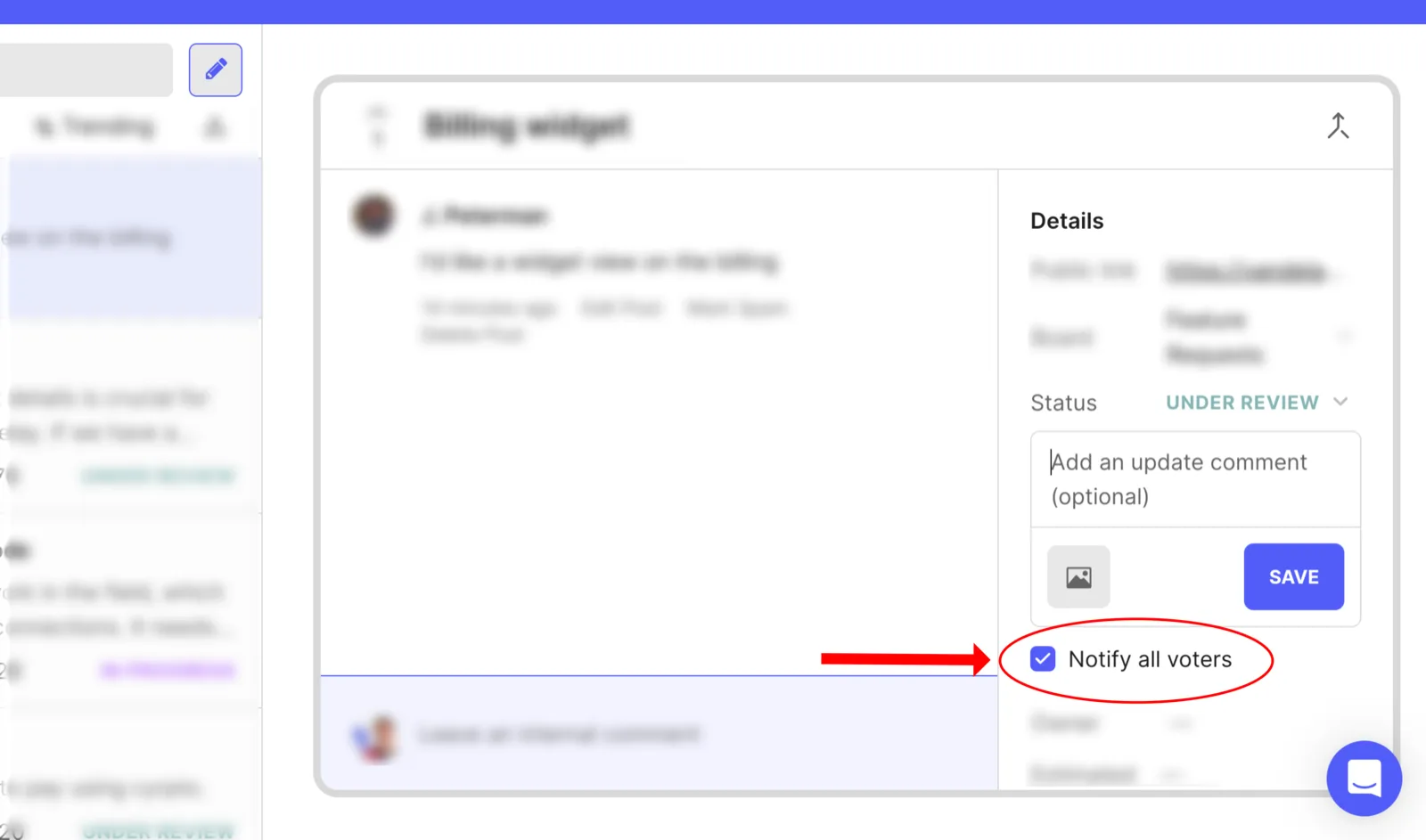
Nothing, at first. Adding the vote sends no email. The person hears from Canny when the post’s status changes, and the status composer has a Notify all voters checkbox that is checked by default plus an optional update comment. A second checkbox, Notify users tracked internally, reaches people who were linked through insights and never voted on the portal at all. A Jira or Linear status change can fire the same email.
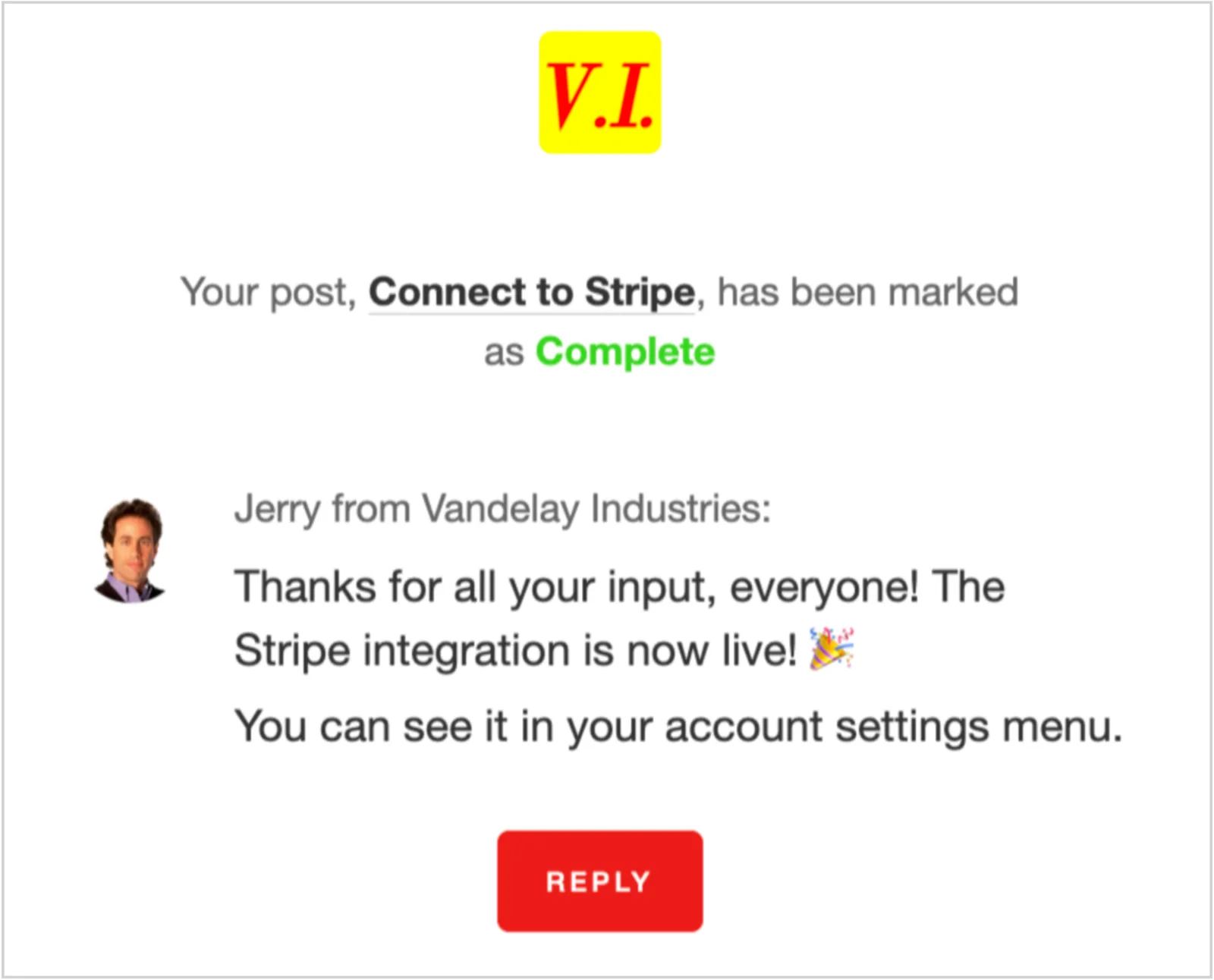
The email itself is good. Logo, “Your post, Connect to Stripe, has been marked as Complete”, the admin’s comment with their name and avatar, a Reply button. It carries the story, not a bare “View” link. Two things bother me about it though. It says “Your post” to someone who never wrote a post, and may not remember mentioning it on a call six weeks ago. And the Reply button opens a mail client to notifications@canny.io, where “the reply is not recorded on the post”. Whitelabelling the sender is a paid add-on on Business.
What does it cost?
Adding the vote is free. The pricing page lists “vote-on-behalf” under Base features with a tick in every column, Free included, and I checked that live. Around it, the gates stack up. Priority is Pro. Internal comments, so the only place for a note, are Pro. The API is Pro. Companies via CRM sync and the opportunity values are Business. Pro is $79/mo billed yearly for 100 tracked users, then steps up per 100.
The tracked-user cap is the real wall, and it is the one design choice here I would not make. Free gets 25 tracked users, and every on-behalf voter is one. A support team that logs every emailed request hits 25 in a week. Canny’s own “Managing tracked users” article is a guide to deleting people to control spend. So the more requests you log, the sooner you pay, or the sooner you start deleting. I understand why (the voter list with spend and deal values is their sales pitch, so the people in it are the product), but the incentive points the wrong way for a small team.
Smaller things. The help centre has some drift: the placeholder above, a voter-list article that still references the retired Growth plan, and no screenshot of the search-or-create step anywhere. And the identity split is hard to explain to a customer. Ordinary voters are named on the public post (I saw that live). On-behalf voters are hidden from the public (documented). A customer added on behalf who then visits the post sees other people’s names and not their own entry. Not wrong, but hard to explain on a support call.
So the shape to keep: add from the post, one pill for priority, admin-only removal, close the loop on status change with the email on by default. What I would change is the note and the tracked-user cap, and both are cheap to change.
How we built ours
Usero already had the pieces. A Post with a vote count and a status, a PostVote keyed by user id, email or hash, a Person with email and MRR, and the requester’s email on every inbox item. Until tonight, changing a post’s status wrote two columns and emailed nobody. The build is seven additive columns on PostVote, no new table: who added it (null means self-cast, same idea as Canny’s by), a three-value priority, a one-line private note, a voter name, a link to the Person when one exists with that email (lookup only, we never mint one), a link to the inbox item the vote came from, and a stamp of the last status the voter was emailed about. That last one is what stops the same status emailing twice.
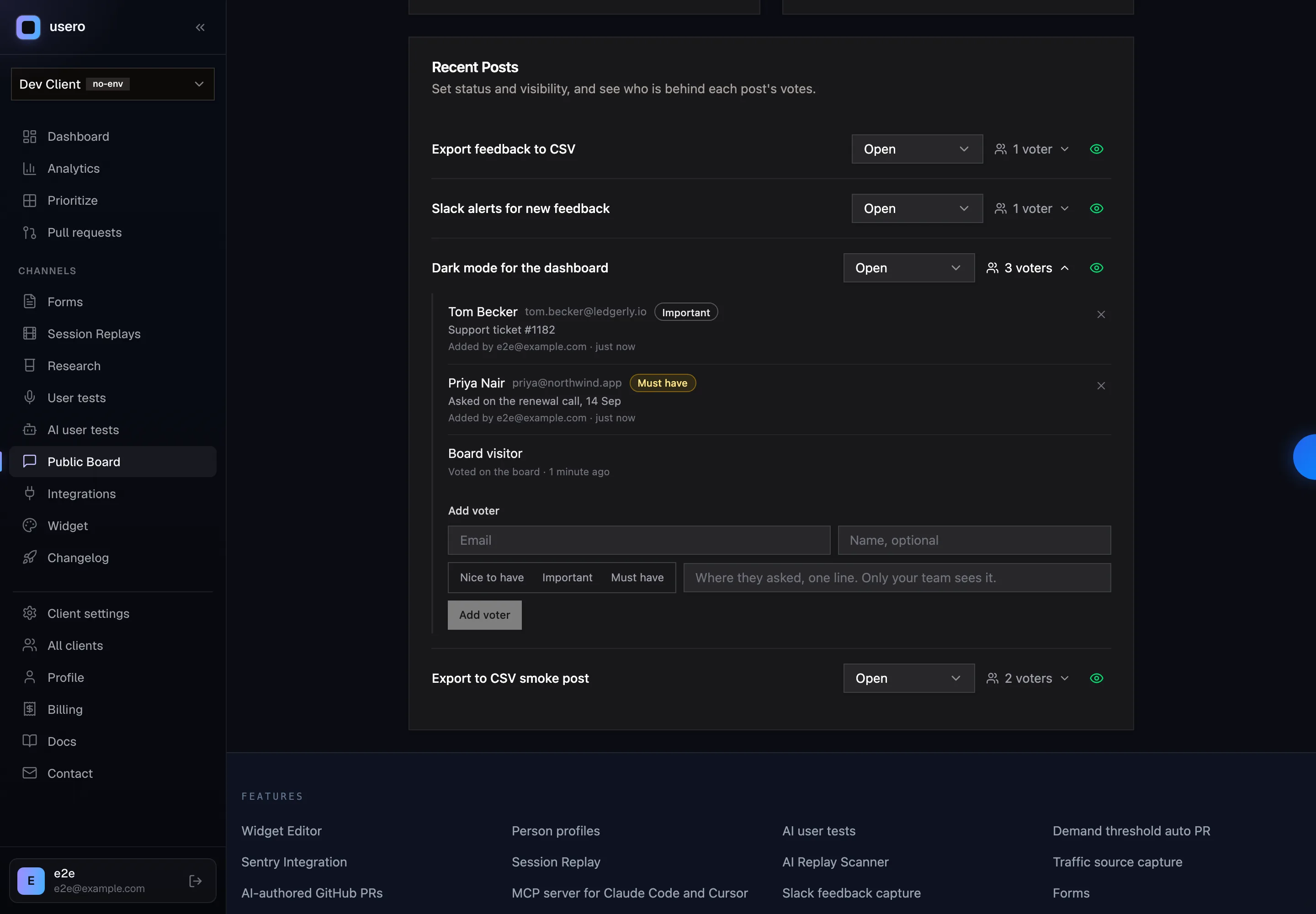
The admin side sits on the Recent Posts list in board settings, no new page. Each post row has an “N voters” disclosure. Open it and the rows read name, email, the priority pill, the note, and either “Added by Will · just now” or “Voted on the board · 1 minute ago” for a self-cast vote (“Board visitor” when all we have is a cookie). The X is on admin-added rows only, same rule as Canny. Under the list is the form: email, name if you have it, the three-value priority, and a note whose placeholder says where it is for, “Where they asked, one line. Only your team sees it.” On the public board the count goes up and no name is shown, which is how our board already worked for every vote.
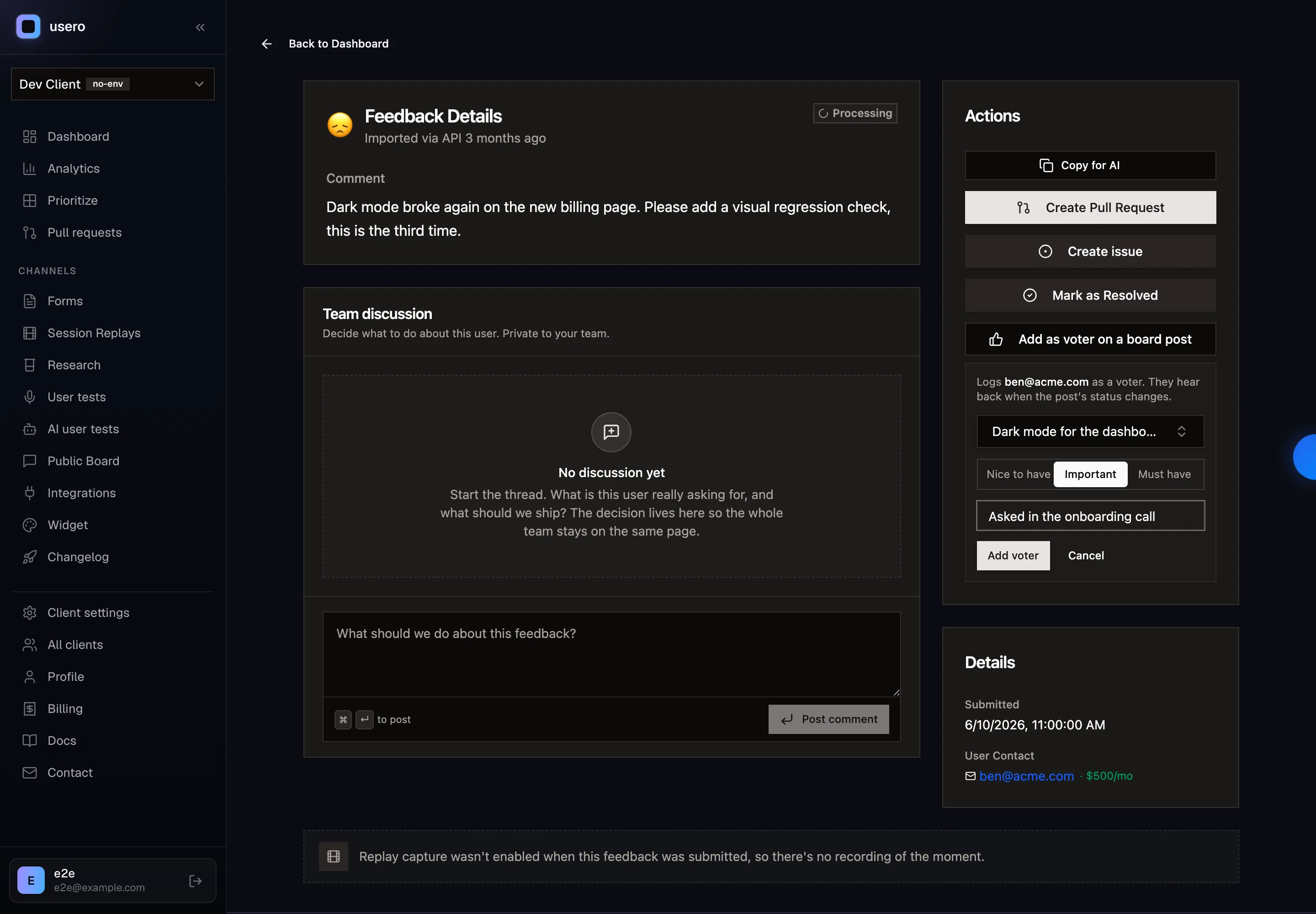
The other entry point is the inbox. Every feedback item now has “Add as voter on a board post” in its Actions column, with a post picker, the priority and the note. It is disabled, with the reason shown, when the feedback has no email. The vote records which inbox item it came from, so the voter row points back at the original message. That is Canny’s “link back to the conversation” column without a CRM. The same two actions are on the public MCP (1.19.0) as add_post_vote and list_post_voters, so a support agent, or an AI one, can log the vote from a ticket without opening the dashboard.
Closing the loop: changing a status now shows an “Email N voters” checkbox, on by default, and an optional comment. The email is headed “A request you’re following on <board>”, since the person may never have written the post, and carries the old status, the new status, your comment, a View the request button and an unsubscribe link. Nothing goes out at vote time; Canny and Featurebase both stay silent there and I think they are right. And nobody is metered. Log 500 voters on Free and the bill does not move. On-behalf votes also count toward cluster demand through the same voter key as any other vote.
One thing the smoke test caught before anyone was emailed. The first version of the notify query used Prisma’s NOT: { notifiedStatusId: newStatusId } to skip voters already told about this status. A voter who has never been emailed has a NULL stamp, and in SQL NULL != x is not true, so the query matched nobody and the feature emailed nobody. The fix is an explicit OR of “stamp is null” and “stamp is not this status”, plus a unit test for it. Proof for the rest: typecheck clean, 2,569 unit tests, a Playwright spec on desktop and mobile Chrome, and a curl plus MCP smoke.
Not built: the Chrome extension, CRM links, the spend rollup on the voter list. Person.mrr exists (ben above is $500/mo), so the summed $/mo footer is a small follow-up, and it is the part of Canny’s table I keep looking at. I am not sure yet whether a two-person team wants a dollar figure next to every voter, or whether that changes how they read the board. That is the next thing to find out.
Frequently Asked Questions
How does Canny’s vote on behalf work?
An admin opens a post in the Canny dashboard, clicks the Add voter link beside the voter count in the right rail, searches for an existing user or creates one with a name and email, and the vote lands on the post. The person becomes a tracked user. Nothing is emailed to them at that point. They hear from Canny when the post’s status changes, via a status update email with a Notify all voters checkbox that is on by default.
Is vote on behalf free on Canny?
Adding the vote is a base feature on every plan, including Free. The pricing page lists vote-on-behalf under Base features. The parts around it are paid: vote priority (Nice to have / Important / Must have), internal comments and API access are Pro, CRM-synced companies and opportunity values are Business. Free is capped at 25 tracked users, and every on-behalf voter counts as one.
Can you add a private note to a Canny vote?
Not on the vote itself. The API vote object has by, voter, votePriority and zendeskTicket, nothing else. Canny’s answer is a post-level internal comment, which is a Pro feature, and the Chrome extension pairs the two so a vote and an internal comment go in together.
How is Usero’s vote on behalf different?
Same shape as Canny’s: an Add voter form on the post, a three-value priority, admin-only removal of admin-added votes, and an Email N voters checkbox on every status change that is on by default. Two differences. The note lives on the vote, one line, private to the team, so the reason arrives with the person. And nobody is metered: adding 500 voters on the Free plan is fine. The email also says "a request you’re following", since the person may never have written the post.
Continue reading
How Canny and Featurebase Carry Customer Demand to the Engineering Ticket, and How We Built Ours
Canny shows voters, companies and MRR on a post, but every tracker integration is on Pro and the docs only describe a link on the issue. Featurebase’s Jira panel shows votes live, and its Copy as prompt includes the author’s email. We built a Demand block for issues and AI pull requests: companies, MRR, must-haves and two voter quotes for Linear, Jira and private repos, counts only for public GitHub repos, no emails ever.
6 min read
How Canny Groups Votes by Company, and How We Built Ours
Canny’s “Show votes grouped by company” request has 198 votes and was marked complete in August 2026 by pointing at a new Ideas view. We tested where Canny and Featurebase show the company behind a vote, then built a company count, a Most companies sort and a grouped voter list.
7 min read
How to Recruit Participants for User Research Without a Panel
Recruit participants for user research by writing a behavioural screener and working through sources cheapest first: your own users, their communities, referrals from people close to them, then a paid panel. How many to recruit, what to pay, and how to run a referral round without paying for junk sign-ups.
6 min read
Build a feedback loop your team actually uses
Usero collects, clusters, and turns user feedback into shipped fixes.
Get started free